Amili Perintä
Amili Perintä allows you to outsource reminder handling and debt collection to Visma Amili Oy, removing the need to manage these time-consuming tasks yourself. You can select which invoices are handed over to Visma Amili, while still keeping visibility into the process. The progress of reminder and collection activities can be followed via our APIs (and UI).
The service is provided by Visma Amili (formerly Visma Financial Solutions Oy) and delivered through Maventa. It is included in the Maventa service with no additional fees for using it. The only potential costs are related to the later stages of the debt collection process or if assignments are cancelled. Service contract and price list.
To activate the Receivables Management service, use the REST API method PUT /v2/services/amili/receivables to start the activation process. You can track the activation status using GET /v2/services/amili/receivables.
Activation requires a company representative authorized to act on behalf of the company to complete and sign an electronic agreement with Visma Amili. Authorization can be based on the individual’s position in the company or a power of attorney, which must be attached if applicable. Personal online banking credentials or Mobile ID are needed to complete the form. This is required under the Money Laundering Act to verify the customer and their activities.
The authentication and signing process is handled by our partner, Netvisor KYC.
There are two ways to handle the KYC step from the ERP:
-
Authorization email – By providing an email address in the authorization_email parameter, a link to the Netvisor KYC service is sent to that address. If this parameter is left empty, no email is sent.
-
Direct link from ERP – The GET /v2/services/amili/receivables method returns a link in the activation_url parameter to the Netvisor KYC service. This link can be displayed directly in the ERP. If using this method, leave the authorization_email parameter blank.
Note: If the KYC process is not completed within a week, a reminder email will be sent to the contact person with the activation link.
Parameters for the PUT /v2/services/amili/receivables call
| Parameter | Description |
|---|---|
| iban | The account (IBAN) where Visma Amili will transfer the funds collected from the invoice recipient. Only one account can be used. |
| bic | Bank identification code e.g. DABAFIHH |
| bank | Name of your bank |
| contact_person | Contact person name |
| contact_email | Email for possible problem cases and contacting |
| contact_phone_number | Phone number for the contact person |
| authorization_email | Email for sending the request to sign the electronic agreement. If left blank, email is not sent |
| accountable_party | Should be set as “vfsfi” (default) or left out. Does not apply to Amili Perintä service |
| service_type | Service type needs to be set us “express”. if left empty it will use the default value “full” which means the Amili Kassavirta service |
| customer_service_email | For reminder and debt collection letters. |
| customer_service_phone_number | For reminder and debt collection letters. |
| billing_address | Billing address for possible service costs related to the debt collection processes in the later phase. Price list |
| postal_address | Company’s postal address |
Once the agreement is signed and verified by Visma Amili, the service will be activated, usually within 1–2 business days. You can use GET /v2/services/amili/receivables to check the activation status, or register a webhook to receive a notification from Maventa when the service is activated or rejected.
Amili Perintä can also be activated through our user interface.
UUSI TÄMÄ KAPPALE!! LISÄÄ VIRHEEN KÄSITTELY
Due invoice can be transferred to the Amili Perintä service via the following API methods:
Transfer invoice:
POST /v1/invoices/{id}/assignment
As an input you will need to provide the invoice id (uuid) for an over due invoice, and the preferred collection type
reminder_and_collection - transfer the invoice to a full reminder and debt collection process collection - transfer invoice directly to the collection process as you have already handled the reminder sending yourself
Possible errors:
If the due date of the invoice is not in the past, the API returns the following error as only invoices having due date in past can be transferred to the Amili Perintä service:
Error: response status is 400
{
  "code": "invalid_parameters",
  "message": "Request parameters are invalid",
  "details": [
    "Invoice not expired"
  ]
}
See the status of the transfer:
GET /v1/invoices/{id}/assignment
Pending - Waiting for the transfer Sent - Transfer successful and an assignment is created. Response will also contain a link to the newly created assignment Error - Trasfer failed (Most common reason is invalid XML file, or missing receiver’s address details) Note! API does not return the error reason
When invoice due date is in past, a button to transfer invoice to Amili Perintä will appear on UI under the sent invoice details.
Invoice content requirements
- Only invoices with currency EUR are accepted.
- Valid XML file. Service does not support the following invoice XMLs: OIOXML, WoodX, BGC, Axflow, Facturae, PX, UBL, Facturae.
- Full receiver’s address information is given: If there is something missing from the receiver’s address details your invoice will not be successfully forwarded for the Amili Perintä service.
- Sum of lines must equal the total sum of the invoice
- Duplicate invoice numbers are not allowed in most cases. Ensure that each invoice number is unique, avoiding any reuse. However, there are few exceptions to this rule:
- If a new invoice has a different invoice date than an existing assignment (open or closed), a new assignment with the same invoice number is created.
- If a new invoice has the same invoice date as an existing closed assignment with no associated payments or credit notes (manually closed or canceled by the sender), a new assignment with the same invoice number is created.
- If a new invoice has the same invoice date as an existing open assignment with no associated payments or credit notes, and the invoice connected to that assignment is in an error state, the existing assignment is closed, and a new assignment with the same invoice number is created.
When an invoice is transferred to the Amili Perintä service for the reminder and debt collection process, Visma Amili sends the first reminder 10 days after the invoice due date for B2B invoices and 14 days after the due date for consumer (B2C) invoices. If the invoice is transferred directly to the collection process, the first action is the sending of a payment demand.
Reminders and payment demands are always sent via regular postal mail. Letters are not sent on weekends or public holidays, which may extend the timeline by a few days in some cases.
The language of reminders and debt collection letters is determined by the customer’s language code specified in the original invoice (Finvoice InvoiceRecipientLanguageCode). If no language is defined, Finnish is used as the default language.
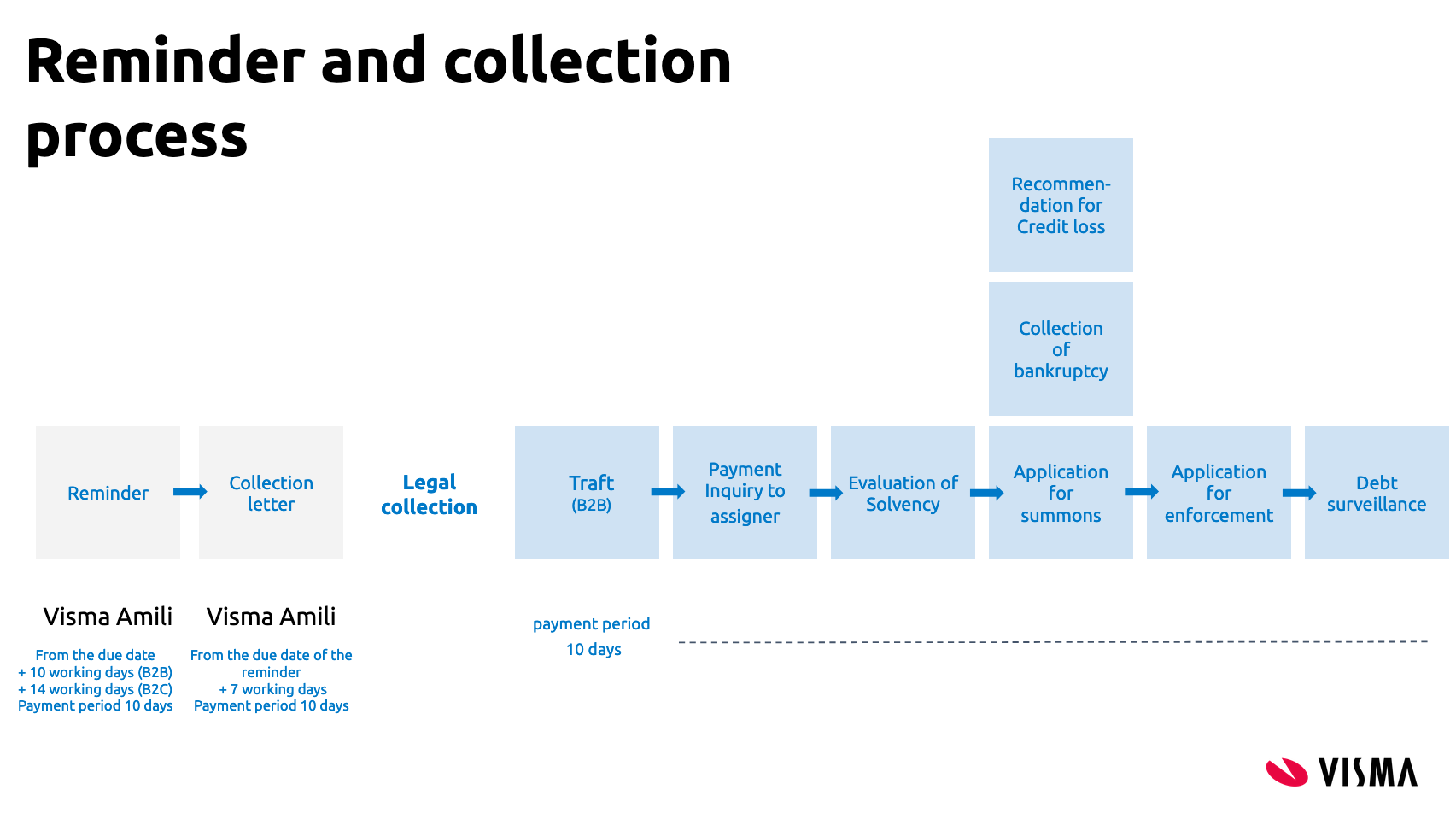
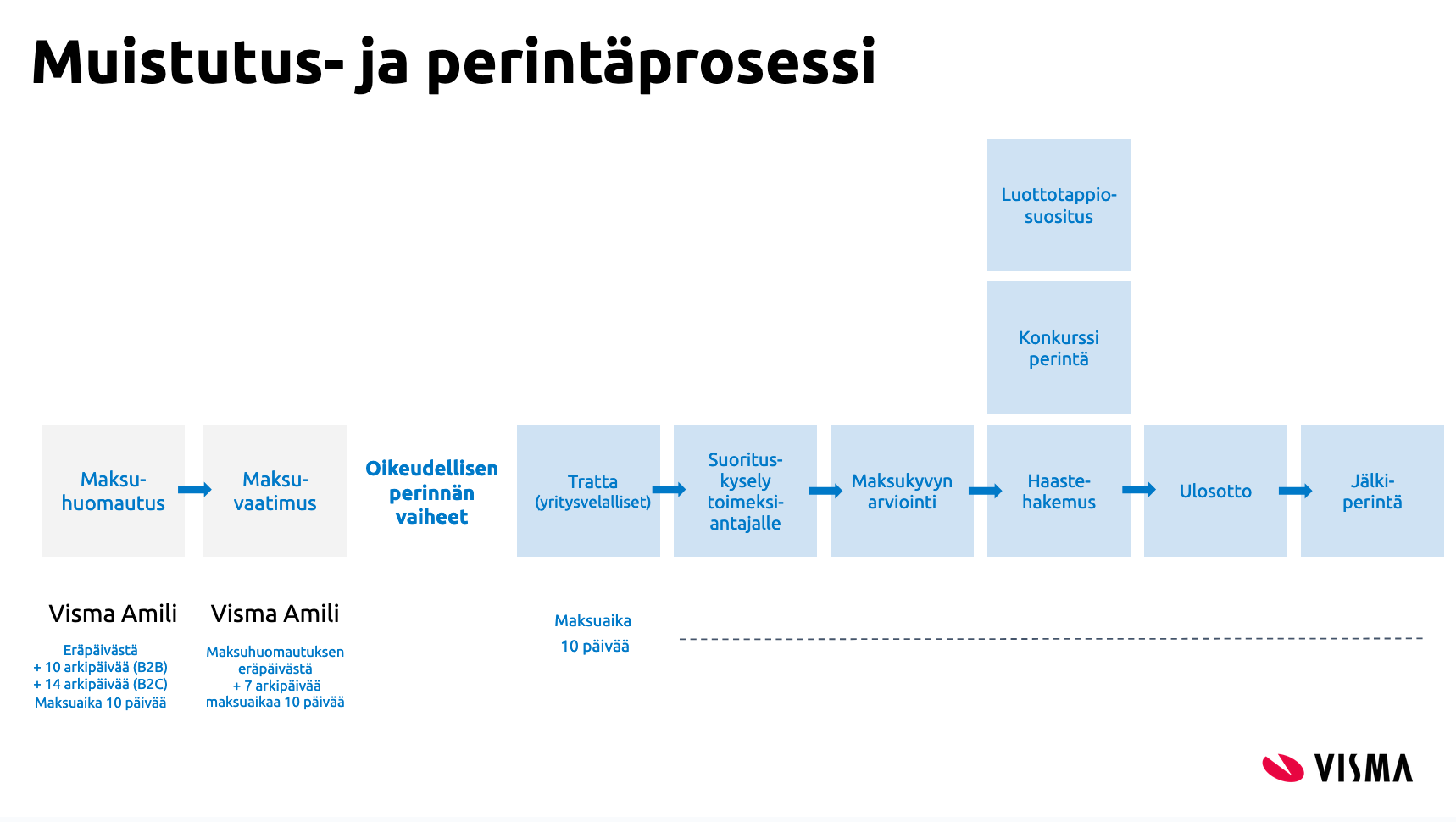
Schedule for reminder and debt collection process (In Finnish)
Every invoice tranferred to Amili Perintä service automatically generates an assignment. An assignment represents the invoice’s lifecycle within Visma Amili and is used to track its status, payment progress, and all communication between Visma Amili and the sender.
Each assignment contains the fields reference_ids and invoice_id, which link the assignment to the original invoice using the invoice UUID.
Assignments can have one of three statuses:
- Open – The invoice is still unpaid and Visma Amili continues monitoring and processing it.
- Partially closed – The invoice has been paid, but additional fees or charges remain for Visma Amili to collect.
- Closed – The invoice and all related charges are fully paid, and Visma Amili has transferred the funds to the company or assignment has been credited or closed otherwise.
REST API for assignment handling.
| Parameter | Description |
|---|---|
| id | Assignment id |
| status | Open (unpaid) / closed (paid or cancelled) / partially_closed (Invoice is paid but additional fees or charges remain for Visma Amili to collect) |
| collection_status | Collection status of the assignment. Set based on event added by the agency. Values can be “unknown” (default value until reminder is sent/collection process starts), “reminder_sent”, “debt_collection”, “legal_collection”, “recovery_proceedings”, “debt_surveillance”, “lack_of_means”, “payment_plan” |
| service_level | default (normal process) / premium / vip |
| debtor | “name”: Name of customer (receiver of the invoice) and “bid”: customer’s bid |
| due_date | due date from the original invoice or new due date if due date change request is accepted |
| issued_at | Invoice date from the original invoice |
| number | Invoice number from the original invoice |
| sum | Total sum of the invoice |
| paid | Amount that is paid or credited |
| currency | Currency from the original invoice |
| created_at | When assignment was created |
| updated_at | When assignment was updated last time (e.g. when paid sum was updated) |
| partially_closed_at | When assignment was partially closed by Visma Amili |
| closed_at | When assignment was closed by Visma Amili |
| reference_ids | Contains three ids: “agency_id” = collection agency id, “invoice_id” = id of the original invoice (invoice uuid), “number” = New reference number that was changed to the original invoice |
Json example of assignment and its event
[
  {
    "id": "fa9781ba-20d1-4677-a125-f04bff7bbac0",
    "status": "open",
    "collection_status": "reminder_sent",
    "service_level": "default",
    "debtor": {
      "name": "Test receiver Oy"
    },
    "due_date": "2020-04-20",
    "issued_at": "2020-04-01",
    "number": "64488",
    "sum": 12.3,
    "paid": 10,
    "currency": "EUR",
    "created_at": "2020-04-15T05:47:07Z",
    "partially_closed_at": null,
    "updated_at": "2020-04-15T21:01:18Z",
    "closed_at": null,
    "reference_ids": [
      {
        "type": "agency_id",
        "value": "078dbb88-ef8e-4115-8260-c8a542aaa87c"
      },
      {
        "type": "invoice_id",
        "value": "f6dcf18d-a1bd-4e72-bb8a-80908527b6c8"
      },
      {
        "type": "number",
        "value": "356241887794"
      }
    ],
    "events": [
      {
        "id": "c0c56722-a28b-49d1-aa87-1c4d7f3cf1af",
        "type": "paid",
        "data": {
          "sum_paid": 10,
          "booked_at": "2020-04-16",
          "archive_number": "12345"
        },
        "party_id": "938fc79f-9c00-47af-8507-cdf15838aa96",
        "seens": [
          {
            "seen_at": "2020-04-15T22:00:06Z",
            "seen_by": "Amili Oy FI"
          }
        ],
        "created_at": "2020-04-15T21:01:18Z",
        "happened_at": "2020-04-16T00:00:00Z"
      }
    ]
  }
]
REST API for assignment handling.
| collection_status | Events that sets the collection status |
|---|---|
| unknown | default value until reminder is sent or collection activities are started |
| reminder_sent | reminder_sent / second_reminder_sent |
| debt_collection | collection_started (first payment demand is sent) / second_demand_sent / tratta |
| legal_collection | legal_collection_started |
| recovery_proceedings | application_for_enforcement |
| debt_surveillance | credit_loss_suggestion (Note! credit_loss event does not change the collection status) |
| lack_of_means | lack_of_means |
| payment_plan | payment_plan |
Assignments can also be created in Maventa without delivering the invoice to the recipient, and then transferred directly to the Amili Perintä service. This is useful in situations where the invoice has already been delivered to the customer outside of Maventa.
Manual creation of assignments is done via POST /v1/invoices using the parameter prevent_routing = true. When this parameter is enabled, the invoice is marked as SENT immediately, without any delivery to the receiver.
After the invoice has been created, the Amili Perintä APIs described above can be used to transfer the invoice into the reminder and/or debt collection process.
Creating manual assignments results in debit action and it will be billed according to the existing price lists.
Parties involved in an assignment (the sender company and Visma Amili) are able to add events to communicate changes related to the assignment. Events describe actions that have taken place for example, when a customer pays an invoice, Visma Amili will automatically add a paid event. Events may also be used to update assignment details from the sender side, such as notifying about direct payments. In practice, events serve as a communication channel between Visma Amili and the sender company.
We strongly recommend automating event creation from your ERP whenever possible. At minimum, the paid and credit_note events should be automated to ensure they are always delivered to Visma Amili, without relying on end users to manually trigger them via the UI.
REST API for event handling.
Comment or question
comment – Add a comment or ask a question.
This event allows you to send comments or questions to Visma Amili regarding the specific assignment. Visma Amili may also use this event type to send comments or questions back to your company.
We strongly recommend monitoring comment events closely. A good approach is to create a dedicated view that displays only comment events, clearly separating them from other event types. This ensures that senders can easily see when Visma Amili has added a comment or question that may require attention or a response.
Note: A new and improved messaging feature is now available to better support two-way communication. More information can be found from the next chapter.
Both the company and Visma Amili can create this event type.
Handling payments
paid – Used to report payments made by the customer, notify direct payments, and mark credit notes as used.
Usage scenarios:
- Customer payment through Visma Amili. Visma Amili sends a paid event when the customer pays the assignment, either fully or partially.
- If the assignment is fully paid, Visma Amili will automatically close it (
closeevent added). - If the customer pays more than the invoice amount, the excess is refunded to the customer. Visma Amili does not retain overpayments for future invoices.
- In account statements (such as SEPA), payments processed by Visma Amili appear with
VISMA AMILIas the payer name (length may vary depending on bank). This can help distinguish payments by Visma Amili from direct payments, which will show a different payer name.
- Reporting direct payments Use this event to inform Visma Amili when the customer pays directly to sender company’s account. Payments may be full or partial.
- If additional details are needed, they can be provided using a comment event.
- If the assignment is fully paid, Visma Amili will close it (
closeevent added).
It is very important that direct payments are reported through this event so that Visma Amili can update the open balance or close the assignment correctly. We strongly recommend automating this event in your ERP to ensure direct payments are always reported.
- Marking a credit note as used
When a credit note has been issued and linked to an assignment (
credit_noteevent), it must be marked as used. This is done using the paid event for the credit note, with the payment amount entered as a negative value.
- This allows Visma Amili to close the credit note (
closeevent added). - If the credit note is linked through the UI, it is automatically marked as used.
The paid event updates the paid field in the assignment, but does not modify the sum value.
{
    "type": "paid",
    "data": {
      "sum_paid": 200.5,
      "booked_at": "2019-01-04",
      "archive_number": "12345"
    }
  }
Both the company and Visma Amili can create this event type.
Closing an assignment
close – This event is used by Visma Amili to mark an assignment as closed. An assignment is closed when any of the following occurs:
- the customer has fully paid the assignment
- the sender reports that it has been fully paid (Direct payment)
- the sender reports that it has been fully credited
- the sender requests cancellation of the assignment
Once closed, no further collection activity is carried out for that assignment.
Only Visma Amili can create this event type.
Partially closing an assignment
partially_closed – This event is used by Visma Amili to indicate that an assignment is only partially closed. This situation occurs when the original invoice amount has been fully paid by the customer, but reminder fees or collection charges remain unpaid.
From the sender’s perspective the assignment is finished, but the customer still owes an additional amount to Visma Amili. When this event is added, the assignment status changes to partially_closed.
Once the customer pays the remaining reminder or collection charges, Visma Amili will add a close event and the assignment status will update to Closed.
Closure cannot be reversed or modified.
Only Visma Amili can create this event type.
Connecting a credit note to an assignment
credit_note – This event is used to link a credit note to an assignment. Provide the credit note number and the credit sum when sending this event. The credit sum should be entered as a positive value.
- If the credit note fully covers the assignment, Visma Amili will close the assignment (
closeevent added). - If the credit note was issued through Maventa, you also need to mark it as used by sending a
paidevent for the credit note assignment, with the amount entered as a negative value. - If the credit note was issued outside Maventa, this event should still be sent to Visma Amili to update the assignment.
- If only part of the assignment is credited, Visma Amili will continue monitoring payments and follow the debt collection process for the remaining amount.
Summary when the whole assignment is credited:
- Assignment receives a
credit_noteevent with the credit sum as a positive value. - Credit note receives a
paidevent with the paid sum as a negative value.
We strongly recommend automating this event in your ERP to ensure that a credit_note event is always sent when credit notes are created.
Only company can create this event type.
Cancellation of the assignment
cancel – This event is used to cancel the entire Amili Kassavirta process for an assignment.
- Once cancelled, the assignment will be closed (
closeevent added), and the closure cannot be reversed or modified. - Visma Amili will no longer monitor the assignment or take any collection actions, the company becomes fully responsible for tracking the assignment.
- Important: Do not use this event to report a credit loss.
Note: As with Amili Perintä reminder and/or collection actions starts immidiately after transferring the invoice, Visma Amili will charge the sender for a cancellation fee.
Only company can create this event type.
Temporary suspension of debt collection
Request or update Suspension
freeze – Use this event to request a temporary suspension of the debt collection process for a specific assignment until a specified date.
- Once the suspension is set, Visma Amili will not monitor the assignment or take any collection actions. The company becomes responsible for tracking the assignment during this period.
- Suspension requests can be made only if legal collection has not started and the enforcement authority has not declared the customer insolvent.
- The debt collection process will automatically resume after the suspension end date.
- You can update the suspension by providing a new end date, or end it early by setting the expiration date to today.
Set the parameter “frozen” to true:
{
  "type": "freeze",
  "data": {
    "frozen": true,
    "end_date": "2019-01-04"
  }
}
Only company can create this event type.
Suspension confirmation
freeze_confirmed – Visma Amili sends this event to confirm that a temporary suspension has been applied to an assignment.
{
  "type": "freeze_confirmed",
  "data": {
    "happened_at": "2019-01-04",
    "end_date": "2019-02-15"
  }
}
Only Visma Amili can create this event type.
Termination of suspension
unfreezed – Visma Amili sends this event when the temporary suspension has ended and debt collection for the assignment will resume.
{
  "type": "unfreezed",
  "data": {
    "happened_at": "2019-01-04"
  }
}
Only Visma Amili can create this event type.
Information for interest payments
interest_paid – This event is used by Visma Amili to notify when interest has been paid for an assignment and to provide the interest amount. It is typically received alongside the paid event.
- Interest payments are made daily, with each payment covering all interest accrued on that day.
- In account statements, the payment will appear with the message: “Korkotilitys PVM”.
- The interest in this context is defined by the sender on their invoices for late payments.
Note: Interest must be specified in the invoice XML; including it only on the invoice image is not sufficient.
Only Visma Amili can create this event type.
OLET TÄSSÄ!!
Notification when the first reminder is sent to the customer
reminder_sent - This event is added by Amili Oy when a first payment reminder has been sent of an unpaid invoice. This event will set the “collection_status” of an assignment to reminder_sent if it is not already set.
Only Visma Amili can send this event.
Notification when the second reminder is sent to the customer
second_reminder_sent - This event is added by Amili Oy when a second payment reminder has been sent of an unpaid invoice. This event will set the “collection_status” of an assignment to reminder_sent if it is not already set.
Only visma Amili can send this event.
Notification when the first payment demand is sent to the customer
collection_started - This event is added by Amili Oy when a first payment demand has been sent of an unpaid invoice. This event will set the “collection_status” of an assignment to debt_collection if it is not already set.
Only Visma Amili can send this event.
Notification when the second payment demand is sent to the customer
second_demand_sent - This event is added by Amili Oy when a second payment demand has been sent of an unpaid invoice. This event will set the “collection_status” of an assignment to debt_collection if it is not already set.
Only Visma Amili can send this event.
Tratta is sent
tratta_sent - A tratta has been sent of an unpaid invoice. This event will set the “collection_status” of an assignment to debt_collection if it is not already set.
Only Visma Amili can send this event.
Legal collection is started
legal_collection_started - A summons application has been sent and legal collection of the assignment has started. This event will set the “collection_status” of an assignment to legal_collection.
Only Visma Amili can send this event.
An application for enforcement is sent
application_for_enforcement - An application for enforcement has been sent and the assignment has been transferred to the enforcement authority. This event will set the “collection_status” of an assignment to recovery_proceedings.
Only Visma Amili can send this event.
The enforcement authority has found the debtor insolvent
lack_of_means - The enforcement authority has found the debtor insolvent. This event will set the “collection_status” of an assignment to lack_of_means.
Only Visma Amili can send this event.
A payment plan has been agreed on the invoice
payment_plan - A payment plan has been agreed on the invoice. This event will set the “collection_status” of an assignment to payment_plan.
Only Visma Amili can send this event.
A recommendation to mark the assignment as credit loss
credit_loss_suggestion - A recommendation from Amili Oy to mark the assignment as credit loss. This event will set the “collection_status” of an assignment to debt_surveillance.
Only Visma Amili can send this event.
Mark the assignment as a credit loss
credit_loss - You can mark a credit loss on assignment in question. Reporting a credit loss is only done for the accounting purposes and has no impact on the payment control and monitoring. Amili Oy will continue the collection process. Amili Oy will suggest that the sender marks the assignment as credit loss if they know the customer won’t pay it. Note! After posting, the credit loss cannot be reversed or modified.
Only company can send this event.
Other events (not applicable for Amili Perintä service)
Following events exists but are not applicable when using the Amili Perintä service. Useful when Amili Kassavirta is in use:
delivery_status
service_level_changed - This event is created by Amili Oy if the customer of the invoice (receiver) is either on the VIP or PREMIUM service level group. If the service level group is changed, there will be a new event added. This event will set the “service_level” of an assignment to default / vip / premium based on the choosen service level group. Service levels are working with the Amili Perintä service, but there is really no need to use them.
due_date_changed - This is an event that will be received when due date change request is approved by Amili Oy. This will update the assignment’s due date. Note! This won’t update the original invoice in question.
due_date_change_request - Request a due date change. If there is a need to update the due date of an assignment, you can request the change. Visma Financial Solution Oy will either accept or reject the request depending on the new due date and how far in the collection process the assignment already is. If the debt collection process has been started, due date change will be rejected. When a due date change request is accepted you will receive a confirmation event (due_date_changed event is added) about the acceptance and due date is updated accordingly for the assignment (parameter due_date gets a new value).
Messaging enables two-way communication between Visma Amili and the customer. Customers can add comments or questions related to their assignments, and Visma Amili can send important information concerning the assignments.
It is strongly recommended to include this functionality in the integration to ensure a reliable communication channel and prevent important messages from being missed.
Receivables reporting tool has been designed to give customers a better insight into their receivables and collections activity. Reports can be downloaded for a selected date range (up to 365 days). Two report types are currently available:
- Settlement Report: Provides a summary of all settlements made during the chosen period.
- Credit Loss Recommendation Report: Highlights potential credit losses based on historical data.
Both reports are available in PDF and Excel formats, customers can choose the one that suits their needs, whether it’s for quick viewing or deeper data analysis.
When testing the Amili Kassavirta in our test environment, please note that activation is not automated. To complete the activation flow, you must contact our support team as Amili needs to perform a manual configuration. After activation, all other functionality can be tested normally. This manual step applies only to the test environment—activation in production happens automatically.
Amili Kassavirta service can be closed by calling DELETE /v2/services/amili/receivables or then by closing the service through the user interface. After the service is closed new invoices sent are not routed through Visma Amili anymore. Visma Amili will still handle the open assignments.
NOTE! Even if the user closes the service, API access may still be required to monitor remaining open assignments and perform any necessary actions.