Amili Kassavirta
Amili Kassavirta takes care of payment monitoring, payment allocation, sending reminders, and debt collection on behalf of the company. The company only needs to create and send invoices as usual (including handling any invoice sending related errors), the service handles everything after that.
The service is provided by Visma Amili (formerly Visma Financial Solutions Oy) and delivered through Maventa. It is included in the Maventa service with no additional fees for using it. The only potential costs are related to the later stages of the debt collection process or if assignments are cancelled. Service contract and price list.
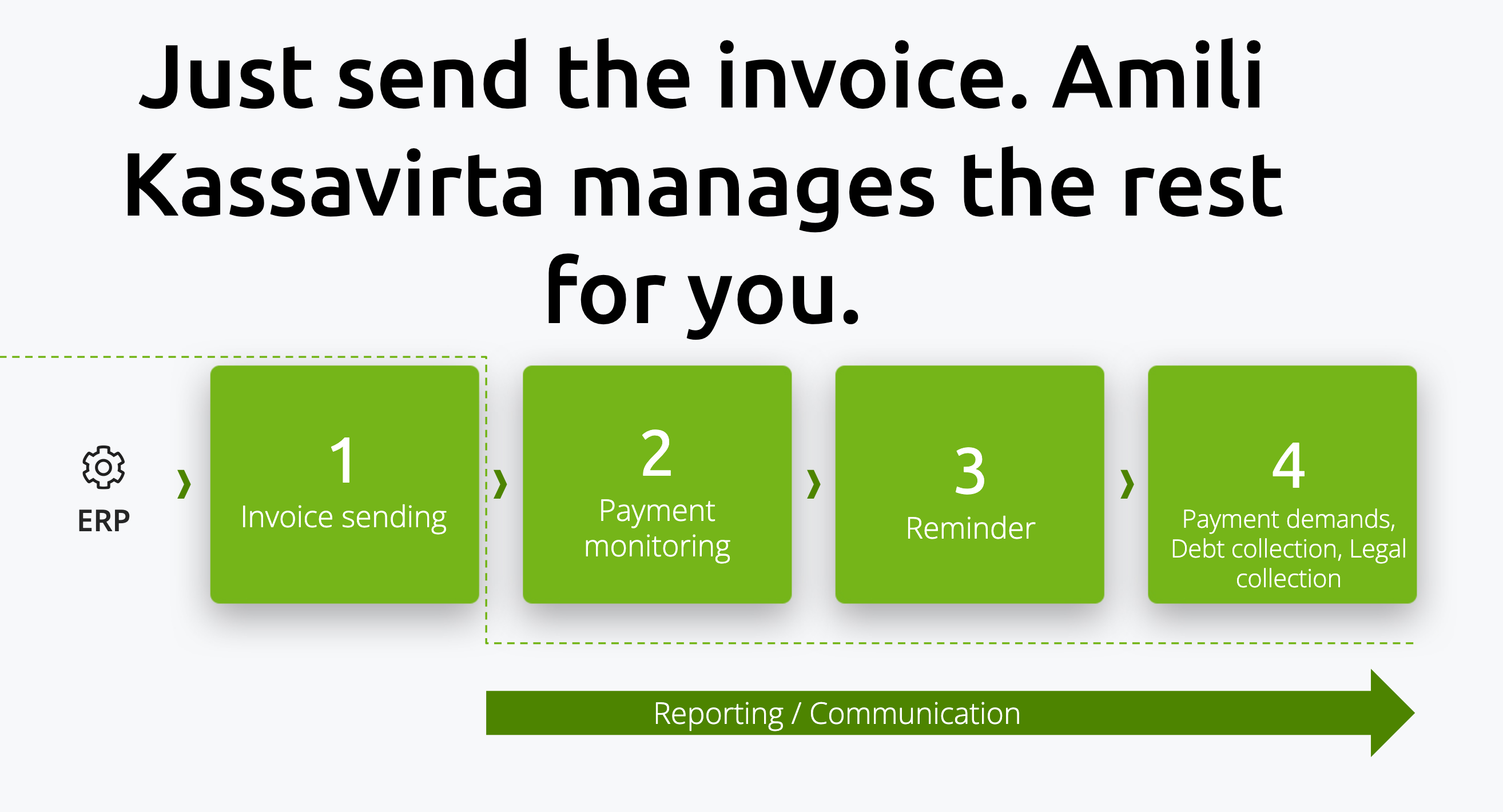
-
Activation of the service Once activated, all invoices are routed through the Amili Kassavirta, with a few exceptions. What is not routed through the service.
-
Invoice sending from ERP Invoices are sent from the ERP to Maventa as usual. Ensure the invoice XML is valid and meets the Amili Kassavirta invoice content requirements.
-
Invoice processing by Amili Kassavirta Maventa passes the invoice XML to Visma Amili. During this process, the invoice XML will be modified. For example, the IBAN, payee information, and other relevant fields are updated to reflect Visma Amili’s payment details. See the [full list of modified field].
-
Sending modified invoice to receiver Since the invoice XML is modified, a new PDF invoice image is generated to match the updated data. The modified invoice, the regenerated PDF, and any original attachments are then sent to the receiver through the standard Maventa process. The sender remains responsible for any sending errors and ensuring the invoice reaches the receiver. At this stage, a Amili Kassavirta assignment is created, which can be used to track the process on Visma Amili’s side.
-
Payment The receiver pays the invoice using Visma Amili’s payment information. Visma Amili then transfers the payment to the sender’s account. When an invoice is fully or partially paid, Visma Amili creates an event for the assignment to indicate the payment status.
-
Reminders and debt collection If the receiver does not pay on time, Visma Amili handles reminder sending according to their process schedule and, if necessary, the debt collection process. All updates can be tracked via the assignment events.
If you use your own invoice image and payment details with the service, this process does not fully apply. Learn more about using your own invoice image and payment details
- Only invoices in EUR are accepted. Invoices in other currencies bypass the service and are sent directly to the receivers, with Visma Amili not responsible for monitoring them.
- The service does not support the following invoice XML formats: OIOXML, WoodX, BGC, Axflow, Facturae, PX, UBL.
- Consumer e-invoices to netbanks are not routed through the service immediately after activation. There is a 5-day delay, during which all consumer e-invoices are sent directly to the banks instead of through Receivables Management. This delay allows the company enough time to update consumer agreements (SI-messages) with the banks. After the delay, consumer e-invoices are routed through Receivables Management like all other invoices. See more in How to Handle Finnish Consumer Invoicing.
Invoices must include the complete address. If any part of the address is missing, the invoice will end up in an error state with an example error:
SEND ERROR (REASON: RECEIVABLES-SERVICE: Postal code for CITY_NAME xxxxxx not found (code #5)).
The invoice with missing address details will not be sent to the receiver. You must correct the address, create a new invoice, and resend it.
The invoice due date must be in the future, with at least 3 days until it is due. If the due date has passed or is within 3 days, the invoice will end up in an error state:
SEND ERROR (REASON: RECEIVABLES-SERVICE: The due date for the invoice is within three (3) days or has already passed (code #13)).
The invoice with due date in past will not be sent. Create a new invoice with a valid due date and resend it.
The sum of the invoice lines must match the total sum of the invoice.
Each invoice number must generally be unique. Exceptions:
- If a new invoice has a different invoice date than an existing assignment (open or closed), a new assignment with the same invoice number is created.
- If a new invoice has the same invoice date as a closed assignment with no associated payments or credit notes (manually closed or canceled by the sender), a new assignment with the same invoice number is created.
- If a new invoice has the same invoice date as an open assignment with no payments or credit notes, and the invoice connected to that assignment is in an error state, the existing assignment is closed, and a new assignment with the same invoice number is created.
If a duplicate invoice number is not allowed, the invoice will fail with:
SEND ERROR (REASON: RECEIVABLES-SERVICE: An assignment for this invoice number xxxx already exists and is still open. If you want to open a new assignment for this invoice number, you must first cancel the existing one (code #6 ...)).
You must create a new invoice with a unique number and resend it. We strongly recommend preventing duplicate invoice numbers in the ERP to avoid these errors.
Important: If an invoice ends up in any error state prefixed with SEND ERROR (REASON: RECEIVABLES-SERVICE...), the invoice is not sent to the receiver at all. The sender must correct the invoice content and resend.
Invoices are sent through the Amili Kassavirta service just before the invoice leaves Maventa. Errors can occur even days after that. The sender is responsible for ensuring delivery:
-
Wrong e-invoice address: If the receiver no longer accepts invoices at the provided e-invoice address, the sender must reroute the invoice. Rerouting can be done through the user interface under invoice details or via the ERP API. Rerouting does not create a new assignment.
-
XML content errors: If the error is in the invoice XML, the sender must create a new corrected invoice. The original erroneous invoice should be credited in the ERP, and a credit_note event should be sent to notify Visma Amili to close the assignment. Automating this in the ERP is strongly recommended. The new invoice must use a new invoice number to avoid duplicate number errors.
-
IBAN – Visma Amili replaces the payment information on the invoice with their own IBAN. This ensures the receiver pays Visma Amili, who then transfers the funds to the sender using the account provided in the service activation. The original invoice reference number is used for the payment.
-
Reference number – Visma Amili replaces the reference number on the invoice with their own.
-
Factoring clause – A factoring clause is added to indicate that the invoice has been assigned to Visma Amili for payment handling. This informs the receiver to pay Visma Amili instead of the original sender and ensures that payment instructions are clear. It also provides legal clarity regarding the assignment of the invoice. For the factoring clause, senders can specify their own contact email and phone number during the activation process.
-
InvoiceFreeText – New InvoiceFreeText elements are added to provide a link to Visma Amili’s customer service for the receiver: “VERKKOPALVELU: https://www.laskuhelposti.fi/ KIRJAUTUMISTUNNUS: xxxx.” Existing InvoiceFreeText elements are not overwritten, the new ones are added.
-
Modified Finvoice XML elements – The following XML elements are updated: SellerAccountDetails, EpiBfiIdentifier, EpiBeneficiaryPartyDetails, EpiReference, EpiRemittanceInfoIdentifier, VirtualBankBarcode, FactoringAgreementIdentifier, FactoringFreeText, InvoiceFreeText
-
Invoice image – Maventa generates a new invoice image from the modified XML to ensure the receiver sees the correct information.
If you use your own invoice image and payment details with the service, some of these changes do not apply. Learn more about using your own invoice image and payment details.
If the receiver does not pay the invoice on time, Visma Amili will first send a reminder. For B2B invoices, the first reminder is sent 10 days after the due date, and for consumer invoices (B2C), 14 days after the due date. Reminders are always sent by regular post. Letters are not sent on weekends or public holidays, which may add a few extra days to the schedule.
The language of reminders and debt collection letters is determined by the customer’s language code in the original invoice (Finvoice InvoiceRecipientLanguageCode). If no language is specified, Finnish is used as the default.
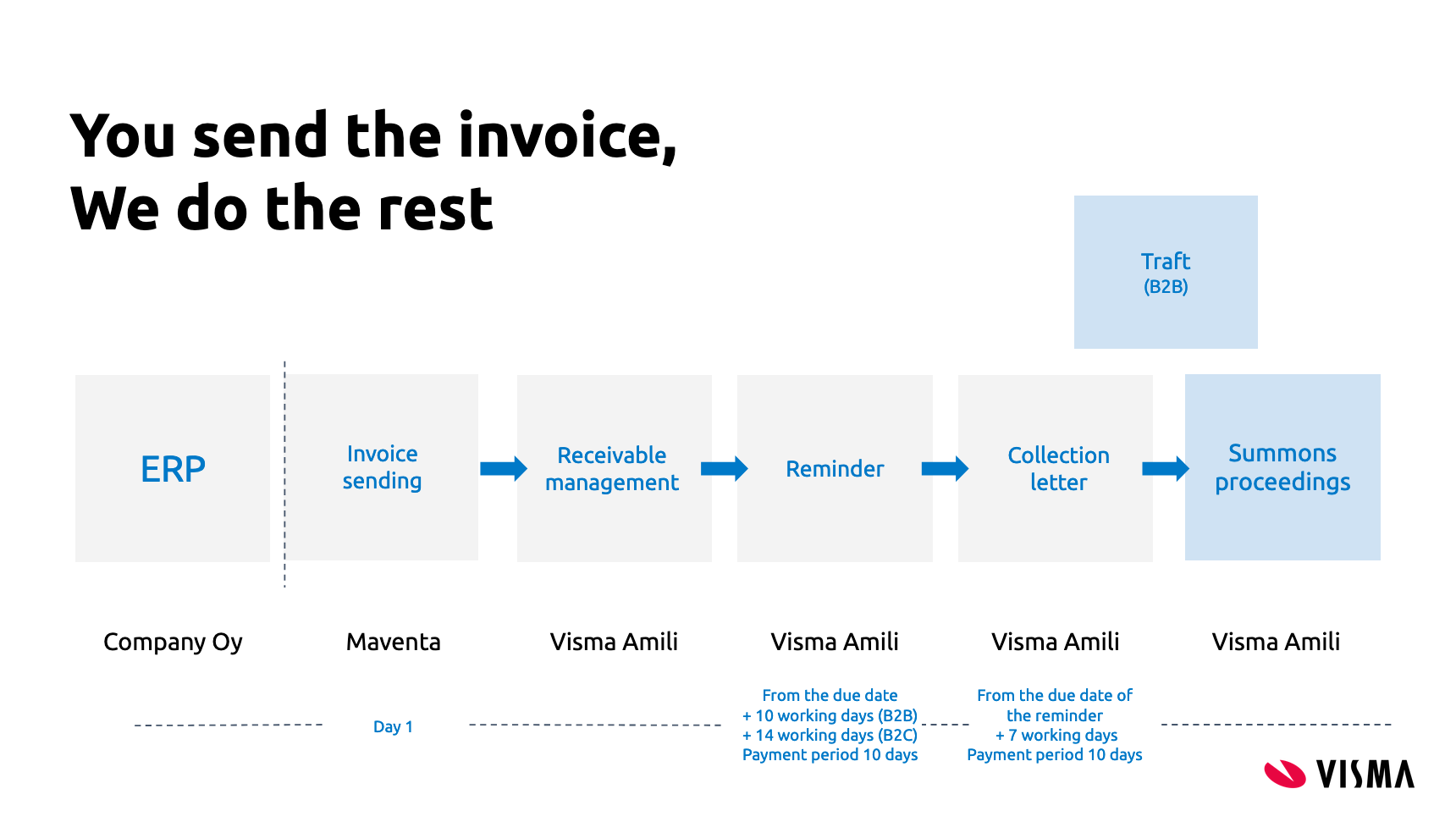
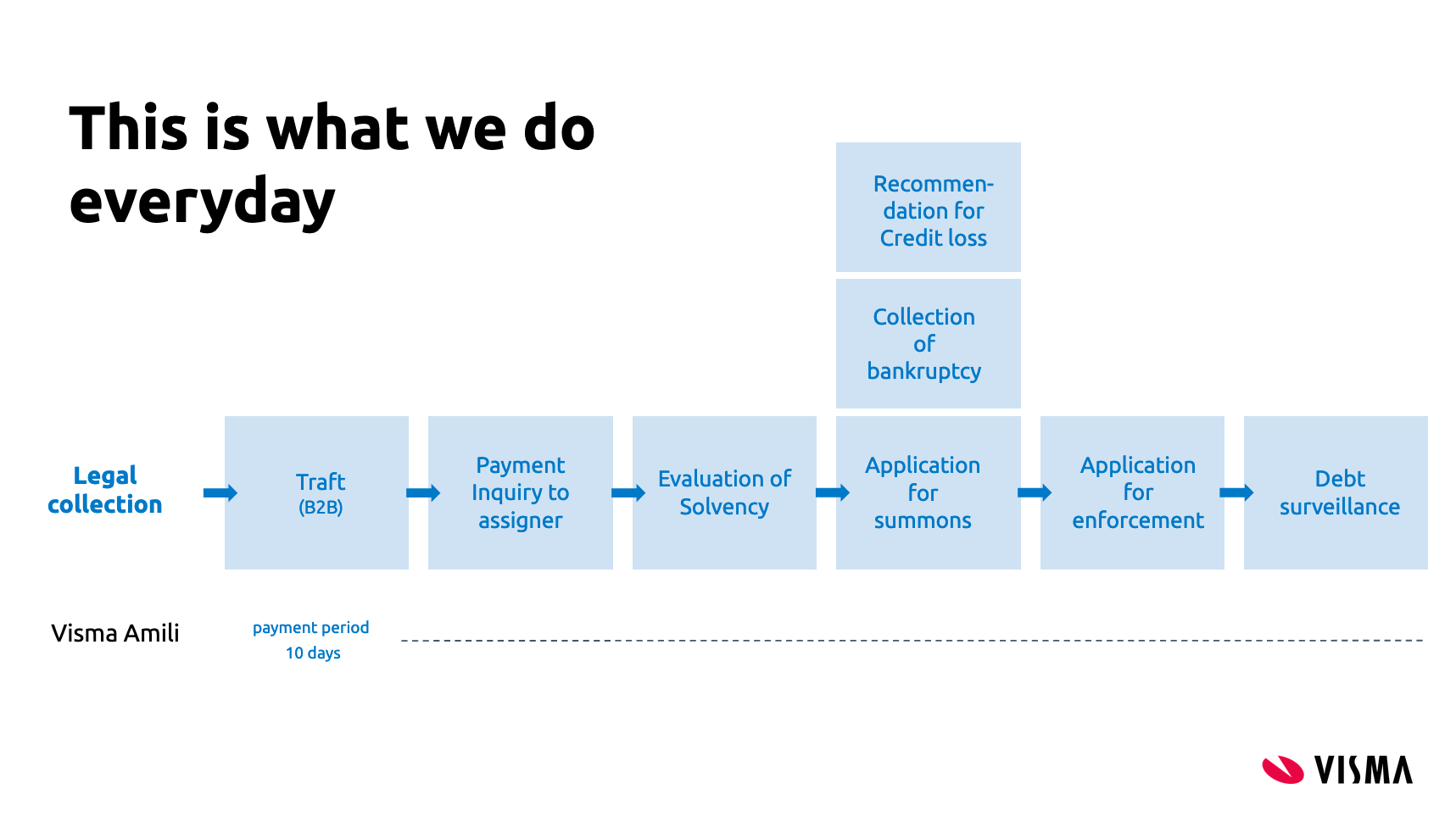
Schedule in Finnish
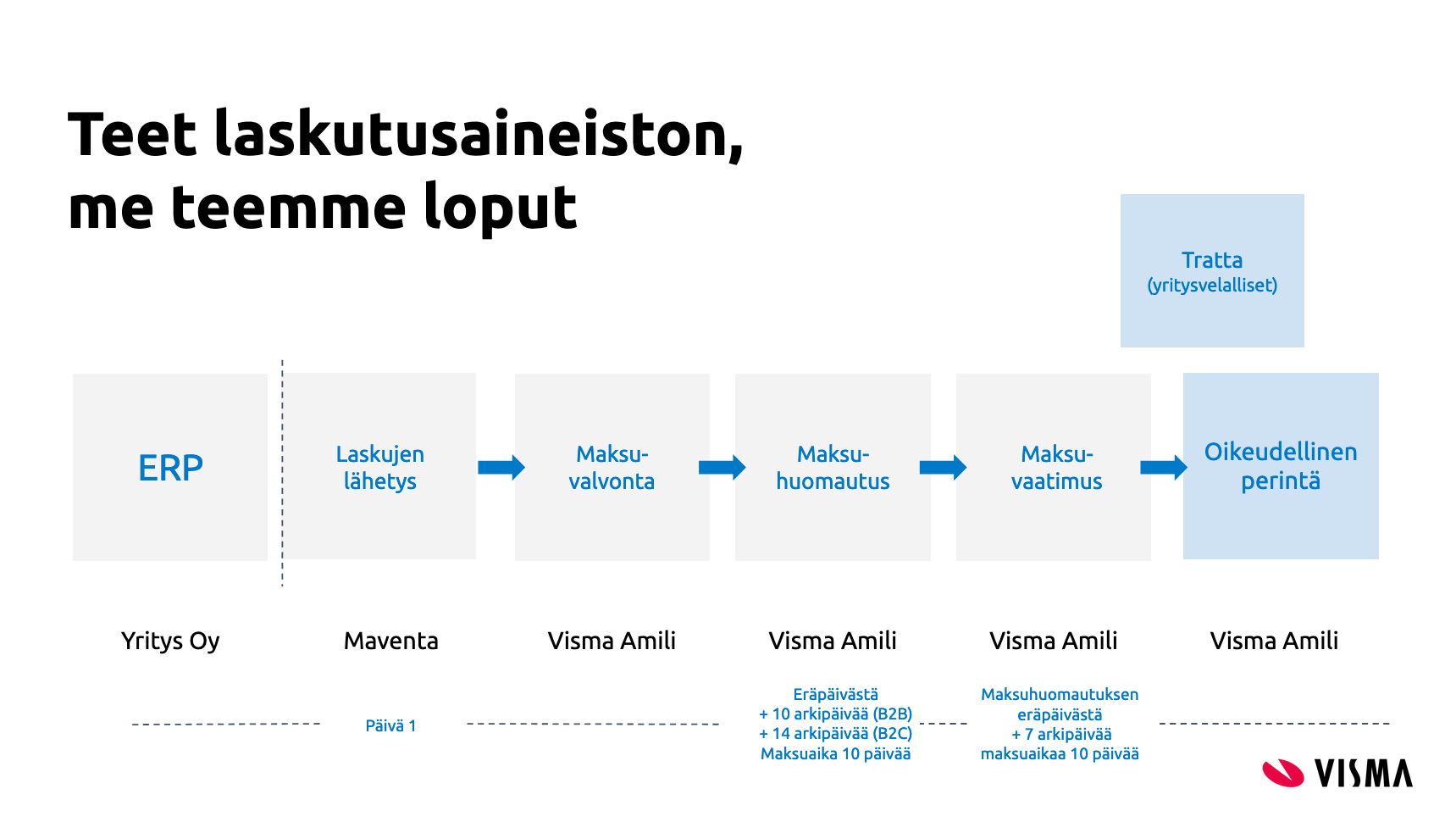
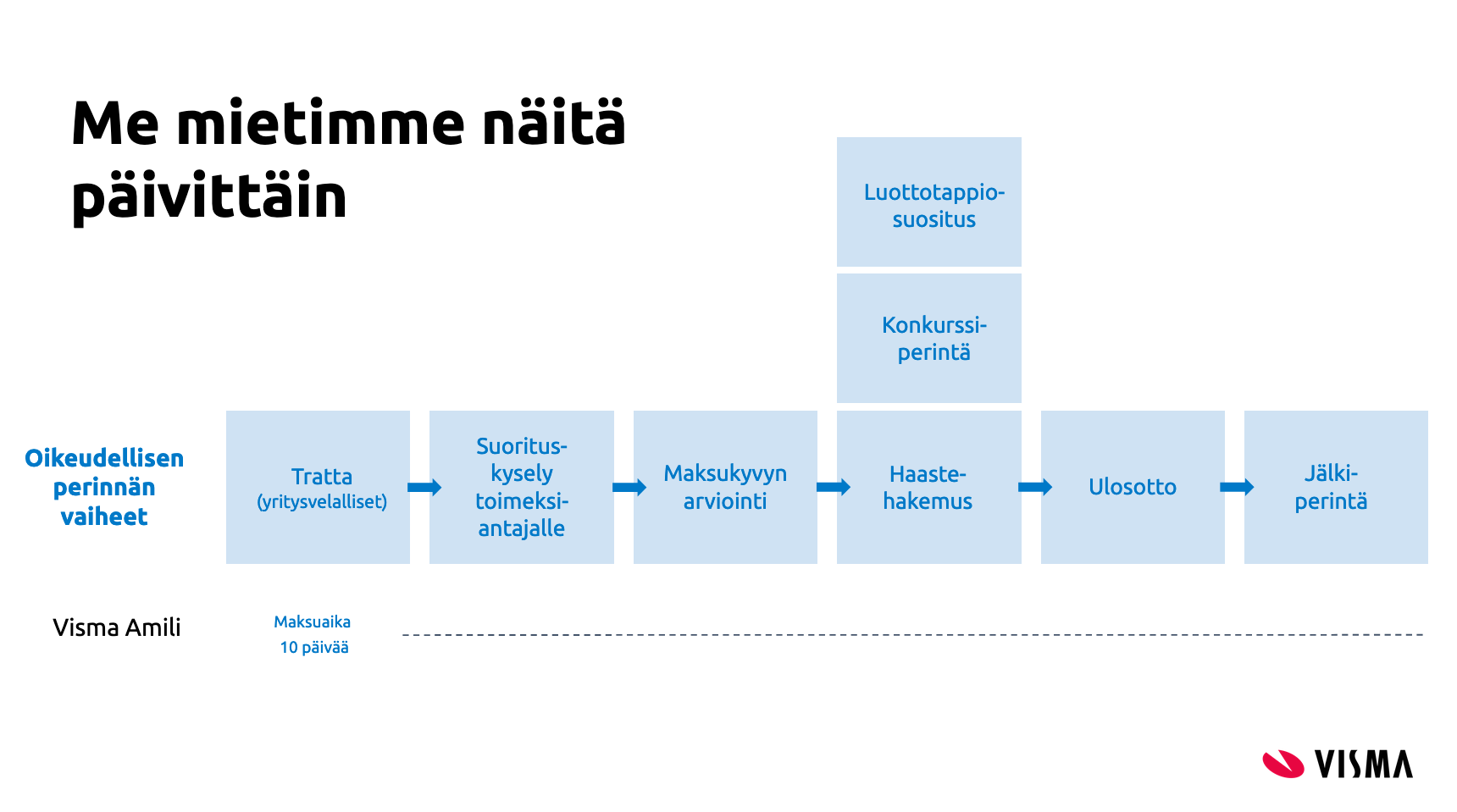
This reminder and debt collection schedule does not apply if the customer has VIP or PREMIUM service level set.
To activate the Receivables Management service, use the REST API method PUT /v2/services/amili/receivables to start the activation process. You can track the activation status using GET /v2/services/amili/receivables.
Activation requires a company representative authorized to act on behalf of the company to complete and sign an electronic agreement with Visma Amili. Authorization can be based on the individual’s position in the company or a power of attorney, which must be attached if applicable. Personal online banking credentials or Mobile ID are needed to complete the form. This is required under the Money Laundering Act to verify the customer and their activities.
The authentication and signing process is handled by our partner, Netvisor KYC.
There are two ways to handle the KYC step from the ERP:
-
Authorization email – By providing an email address in the authorization_email parameter, a link to the Netvisor KYC service is sent to that address. If this parameter is left empty, no email is sent.
-
Direct link from ERP – The GET /v2/services/amili/receivables method returns a link in the activation_url parameter to the Netvisor KYC service. This link can be displayed directly in the ERP. If using this method, leave the authorization_email parameter blank.
Note: If the KYC process is not completed within a week, a reminder email will be sent to the contact person with the activation link.
Parameters for the PUT /v2/services/amili/receivables call
| Parameter | Description |
|---|---|
| iban | The account (IBAN) where Visma Amili will transfer the funds collected from the invoice recipient. Only one account can be used. |
| bic | Bank identification code e.g. DABAFIHH |
| bank | Name of your bank |
| contact_person | Contact person name |
| contact_email | Email for possible problem cases and contacting |
| contact_phone_number | Phone number for the contact person |
| authorization_email | Email for sending the request to sign the electronic agreement. If left blank, email is not sent |
| accountable_party | “vfsfi” (default) or “company”. If set as “vfsfi” Visma Amili’s account details are used. If “company”, company’s own account details are used (note! only allowed for certain vendors) |
| service_type | “full” Amili Kassavirta (default). “express” Amili Perintä |
| customer_service_email | This email will appear in the factoring clause that Visma Amili adds to invoices routed through Amili Kassavirta service. |
| customer_service_phone_number | This phone number will appear in the factoring clause that Visma Amili adds to invoices routed through Amili Kassavirta service. |
| billing_address | Billing address for possible service costs related to the debt collection processes in the later phase. Price list |
| postal_address | Company’s postal address |
Once the agreement is signed and verified by Visma Amili, the service will be activated, usually within 1–2 business days. You can use GET /v2/services/amili/receivables to check the activation status, or register a webhook to receive a notification from Maventa when the service is activated or rejected.
Note: If you have consumer invoicing enabled, you must add the IBAN provided by Visma Amili to your sender info agreements (SI-messages). The IBAN is returned as a parameter in the GET /v2/services/amili/receivables response. Learn more from the Requirements for using Amili Kassavirta with consumer e-invoicing - chapter below.
Amili Kassavirta service can also be activated through our user interface.
If you need to update company information, please contact your support team, as this cannot currently be done through the API.
If Finnish consumer invoicing is enabled for your company, a key update to consumer agreements must be completed before the Amili Kassavirta service can handle e-invoices to netbanks. To allow time for this update, there is a mandatory 7 days transition period. During this period, all consumer e-invoices will continue to be sent directly to banks and will not pass through the Amili Kassavirta service. After the transition, consumer e-invoices will be routed through the service like all other invoices, allowing them to use Visma Amili’s IBAN information.
To use Amili Kassavirta with consumer e-invoicing, you must update your consumer sender agreements (SI messages) with the following:
-
Add Visma Amili’s IBAN Include the IBAN provided by Visma Amili as one of the accounts used for consumer e-invoices. All IBANs that may ever appear on your e-invoices must be listed in the SI-message, as banks will reject invoices containing any IBAN not included in the message. It is recommended to add the new IBAN as an additional account rather than replacing existing accounts.
-
Update the SellerInvoiceIdentifierType This defines the identifier consumers must provide when adding the company as a sender in their netbank. Reference number is not recommeneded to be used.
Some banks use automated routines to identify the seller based on the reference number, IBAN, and beneficiary name. When using Amili Kassavirta, the invoices will contain Visma Amili’s IBAN and beneficiary name, which could cause the consumer to inadvertently create an agreement with Visma Amili instead of your company when bank suggested an e-invoicing agreement for the consumer.
Reference numbers are also problematic because the number sent from the ERP differs from the one received by the consumer, as Visma Amili modifies it during processing. If your ERP uses reference numbers to link new consumer agreements, you must retrieve the reference number used by Amili Kassavirta from the assignment details (GET /v1/assignments/{assignment_id}, parameter reference_ids, type number) and connect it in your register.
If you are currently using SellerInvoiceIdentifierType as 01 (national reference number) or 02 (international RF reference) you should change it 08 (other numeric identifier), 09 (other alphanumeric identifier) or 99 (other identifier) in the SI-message, for a type that banks do not validate.
Create CHANGE-type SI messages for each bank you have an agreement with and add the new IBAN as one of the seller accounts and update the SellerInvoiceIdentifierType to something more convenient described in the previous chapter.
Senders can choose to use their own invoice image and payment details when sending invoices through the Amili Kassavirta service. When this option is enabled, Visma Amili will not modify the payment information, and Maventa will not replace the original invoice image as it normally does in the standard process.
If the company uses its own payment details, all payments will be made directly to the company’s account. In this setup, the ERP must support the full Amili Kassavirta integration, including an automated process for reporting direct payments to Visma Amili via API. This is required so that Visma Amili can correctly update the assignments (mark as paid/closed). See more about Handling payments under the Events chapter for more information.
Because all payments (except those paid by VISMA AMILI / VISMA FINANC) must be reported as direct payments through the API, this option is only available for selected ERP vendor keys that have been verified to have a reliable, automated direct-payment reporting solution.
If you wish to enable this feature for your integration, please contact Maventa support to request verification and approval.
Important: Do not report payments where the payer name starts with “VISMA AMILI” as direct payments. These are reminder/payment demand payments to your company done by Visma Amili.
During service activation, the parameter accountable_party defines who receives the payments:
| Value | Who receives the payment | Invoice/payment details | Notes |
|---|---|---|---|
vfsfi (default)
|
Visma Amili | Service modifies invoice details, Amili’s payment details | Default process |
company |
Sender (your company) | Company’s original payment details & invoice image are used | Direct payments must be reported via API |
If accountable_party is not set, the default value vfsfi is applied. The parameter can also be updated later via: PATCH /v2/services/amili/receivables → set accountable_party = “company”.
If you want to limit debt collection for a specific customer, you can add them to a VIP or PREMIUM customer group. Please note that the default service level is the most efficient option for cash flow and requires no action. Adding a customer to a VIP or PREMIUM group transfers the responsibility for monitoring assignments, preventing expirations, etc., to the sender. In some cases, this may incur additional costs.
Grouping works based on the customer’s business ID, so ensure it is correct both in your records and in the invoice XML when sending. If you later decide to get back to the standard debt collection for a customer, simply remove their business ID from the group. Note that updating a customer group does not affect assignments that have already been closed.
Service levels can be managed via the API using PATCH /v1/service_levels/{customer_bid}
On an assignment the parameter service_level reflects the group: “VIP” or “PREMIUM” if the customer is in one of those groups and “default” if not in a VIP or PREMIUM group.
A service_level_changed event will also be logged if the service level is VIP or PREMIUM. Note: service level updates may take a few hours to appear after an invoice is sent and the assignment is created.
This is the standard payment monitoring process. It is the most efficient for cash flow and requires no action.

- A payment reminder and demand for payment are sent for overdue invoices.
- Collection ends 30 days after the due date of the demand for payment. After this, monitoring and managing the receivable is sender’s responsibility.
- If the invoice is unpaid, a fee of 30€ + VAT applies for the sender

- Only a payment reminder is sent for overdue invoices. No reminder fee is charged to the customer but the sender is billed for a 5€ + VAT fee for each reminder.
- Collection ends 30 days after the due date of the payment reminder, and the case is closed. After this, monitoring and managing the receivable is sender’s responsibility.

- Invoices for these customers will not be sent through the Amili Kassavirta service.
- Sender’s own account number will be used for payments.
- Sender is responsible for monitoring, controlling, and managing these receivables.
- No additional costs are charged for this option.
Every invoice sent through the Amili Kassavirta service automatically generates an assignment. An assignment represents the invoice’s lifecycle within Visma Amili and is used to track its status, payment progress, and all communication between Visma Amili and the sender.
Each assignment contains the fields reference_ids and invoice_id, which link the assignment to the original invoice using the invoice UUID.
Assignments can have one of three statuses:
- Open – The invoice is still unpaid and Visma Amili continues monitoring and processing it.
- Partially closed – The invoice has been paid, but additional fees or charges remain for Visma Amili to collect.
- Closed – The invoice and all related charges are fully paid, and Visma Amili has transferred the funds to the company or assignment has been credited or closed otherwise.
REST API for assignment handling.
| Parameter | Description |
|---|---|
| id | Assignment id |
| status | Open (unpaid) / closed (paid or cancelled) / partially_closed (Invoice is paid but additional fees or charges remain for Visma Amili to collect) |
| collection_status | Collection status of the assignment. Set based on event added by the agency. Values can be “unknown” (default value until reminder is sent/collection process starts), “reminder_sent”, “debt_collection”, “legal_collection”, “recovery_proceedings”, “debt_surveillance”, “lack_of_means”, “payment_plan” |
| service_level | default (normal process) / premium / vip |
| debtor | “name”: Name of customer (receiver of the invoice) and “bid”: customer’s bid |
| due_date | due date from the original invoice or new due date if due date change request is accepted |
| issued_at | Invoice date from the original invoice |
| number | Invoice number from the original invoice |
| sum | Total sum of the invoice |
| paid | Amount that is paid or credited |
| currency | Currency from the original invoice |
| created_at | When assignment was created |
| updated_at | When assignment was updated last time (e.g. when paid sum was updated) |
| partially_closed_at | When assignment was partially closed by Visma Amili |
| closed_at | When assignment was closed by Visma Amili |
| reference_ids | Contains three ids: “agency_id” = collection agency id, “invoice_id” = id of the original invoice (invoice uuid), “number” = New reference number that was changed to the original invoice |
Json example of assignment and its event
[
  {
    "id": "fa9781ba-20d1-4677-a125-f04bff7bbac0",
    "status": "open",
    "collection_status": "unknown",
    "service_level": "default",
    "debtor": {
      "name": "Hanna's Test Company"
    },
    "due_date": "2020-04-20",
    "issued_at": "2020-04-01",
    "number": "64488",
    "sum": 12.3,
    "paid": 10,
    "currency": "EUR",
    "created_at": "2020-04-15T05:47:07Z",
    "partially_closed_at": null,
    "updated_at": "2020-04-15T21:01:18Z",
    "closed_at": null,
    "reference_ids": [
      {
        "type": "agency_id",
        "value": "078dbb88-ef8e-4115-8260-c8a542aaa87c"
      },
      {
        "type": "invoice_id",
        "value": "f6dcf18d-a1bd-4e72-bb8a-80908527b6c8"
      },
      {
        "type": "number",
        "value": "356241887794"
      }
    ],
    "events": [
      {
        "id": "c0c56722-a28b-49d1-aa87-1c4d7f3cf1af",
        "type": "paid",
        "data": {
          "sum_paid": 10,
          "booked_at": "2020-04-16",
          "archive_number": "12345"
        },
        "party_id": "938fc79f-9c00-47af-8507-cdf15838aa96",
        "seens": [
          {
            "seen_at": "2020-04-15T22:00:06Z",
            "seen_by": "Visma Amili FI"
          }
        ],
        "created_at": "2020-04-15T21:01:18Z",
        "happened_at": "2020-04-16T00:00:00Z"
      }
    ]
  }
]
| collection_status | Events that sets the collection status |
|---|---|
| unknown | default value until reminder is sent or collection activities are started |
| reminder_sent | reminder_sent / second_reminder_sent |
| debt_collection | collection_started (first payment demand is sent) / second_demand_sent / tratta |
| legal_collection | legal_collection_started |
| recovery_proceedings | application_for_enforcement |
| debt_surveillance | credit_loss_suggestion (Note! credit_loss event does not change the collection status) |
| lack_of_means | lack_of_means |
| payment_plan | payment_plan |
Assignments can also be created for the Amili Kassavirta service without delivering an invoice to the customer. This is useful in cases where the invoice itself has already been communicated to the recipient outside Maventa.
A common use case is housing companies: they often send one annual invoice covering the entire year, but still need to track and monitor monthly payments. By creating assignments manually each month, payment reminders and collection processes can be triggered automatically if payments are late.
Manual creation of assignments is done via POST /v1/invoices using the parameter prevent_routing = true. When this parameter is enabled, the invoice is marked as SENT immediately, without any delivery to the receiver, and an assignment is created in Amili Kassavirta for normal monitoring.
To use this method, you must provide a valid invoice XML including full recipient address details and a due date in the future. This functionality is restricted to approved ERPs (vendor keys). If you want to enable it, please contact Maventa support team to validate your integration and be added to the allowed list.
Remember to report payments for these invoices as direct payments, as they were originally sent to the receiver with the sender’s own payment details. This means the receiver will pay directly to the sender’s account, not through Visma Amili.
Creating manual assignments results in debit action and it will be billed according to the existing price lists.
Parties involved in an assignment (the sender company and Visma Amili) are able to add events to communicate changes related to the assignment. Events describe actions that have taken place for example, when a customer pays an invoice, Visma Amili will automatically add a paid event. Events may also be used to update assignment details from the sender side, such as requesting a new due date or notifying about direct payments. In practice, events serve as a communication channel between Visma Amili and the sender company.
We strongly recommend automating event creation from your ERP whenever possible. At minimum, the paid and credit_note events should be automated to ensure they are always delivered to Visma Amili, without relying on end users to manually trigger them via the UI.
REST API for event handling.
Comment or question
comment – Add a comment or ask a question.
This event allows you to send comments or questions to Visma Amili regarding the specific assignment. Visma Amili may also use this event type to send comments or questions back to your company.
We strongly recommend monitoring comment events closely. A good approach is to create a dedicated view that displays only comment events, clearly separating them from other event types. This ensures that senders can easily see when Visma Amili has added a comment or question that may require attention or a response.
Note: A new and improved messaging feature is now available to better support two-way communication. More information can be found from the next chapter.
Both the company and Visma Amili can create this event type.
Handling payments
paid – Used to report payments made by the customer, notify direct payments, and mark credit notes as used.
Usage scenarios:
- Customer payment through Visma Amili. Visma Amili sends a paid event when the customer pays the assignment, either fully or partially.
- If the assignment is fully paid, Visma Amili will automatically close it (
closeevent added). - If the customer pays more than the invoice amount, the excess is refunded to the customer. Visma Amili does not retain overpayments for future invoices.
- In account statements (such as SEPA), payments processed by Visma Amili appear with
VISMA AMILIas the payer name (length may vary depending on bank). This can help distinguish payments by Visma Amili from direct payments, which will show a different payer name.
- Reporting direct payments Use this event to inform Visma Amili when the customer pays directly to sender company’s account. Payments may be full or partial.
- If additional details are needed, they can be provided using a comment event.
- If the assignment is fully paid, Visma Amili will close it (
closeevent added).
It is very important that direct payments are reported through this event so that Visma Amili can update the open balance or close the assignment correctly. We strongly recommend automating this event in your ERP to ensure direct payments are always reported.
- Marking a credit note as used
When a credit note has been issued and linked to an assignment (
credit_noteevent), it must be marked as used. This is done using the paid event for the credit note, with the payment amount entered as a negative value.
- This allows Visma Amili to close the credit note (
closeevent added). - If the credit note is linked through the UI, it is automatically marked as used.
The paid event updates the paid field in the assignment, but does not modify the sum value.
{
    "type": "paid",
    "data": {
      "sum_paid": 200.5,
      "booked_at": "2019-01-04",
      "archive_number": "12345"
    }
  }
Both the company and Visma Amili can create this event type.
Closing an assignment
close – This event is used by Visma Amili to mark an assignment as closed. An assignment is closed when any of the following occurs:
- the customer has fully paid the assignment
- the sender reports that it has been fully paid (Direct payment)
- the sender reports that it has been fully credited
- the sender requests cancellation of the assignment
Once closed, no further collection activity is carried out for that assignment.
Only Visma Amili can create this event type.
Partially closing an assignment
partially_closed – This event is used by Visma Amili to indicate that an assignment is only partially closed. This situation occurs when the original invoice amount has been fully paid by the customer, but reminder fees or collection charges remain unpaid.
From the sender’s perspective the assignment is finished, but the customer still owes an additional amount to Visma Amili. When this event is added, the assignment status changes to partially_closed.
Once the customer pays the remaining reminder or collection charges, Visma Amili will add a close event and the assignment status will update to Closed.
Closure cannot be reversed or modified.
Only Visma Amili can create this event type.
Handling Due Date Changes »> Request a due date change
due_date_change_request – This event is used to request a change to the due date of an assignment. Visma Amili will review the request and either accept or reject it based on the proposed new due date and the current stage of the collection process.
- If the debt collection process has already started, the request will be rejected.
- If request is accepted, assignment will receive a confirmation via the
due_date_changedevent, and the assignment’s due_date parameter will be updated accordingly. - If rejected, a
commentevent will be sent with the reason for the rejection.
Only company can create this event type.
Due date change confirmation
due_date_changed – This event is sent by Visma Amili when a due date change request has been approved. It updates the assignment’s due_date parameter to reflect the new due date.
Note: This does not update the original invoice.
Only Visma Amili can create this event type. ^^^
^^^plain start Connecting a credit note to an assignment
credit_note – This event is used to link a credit note to an assignment. Provide the credit note number and the credit sum when sending this event. The credit sum should be entered as a positive value.
- If the credit note fully covers the assignment, Visma Amili will close the assignment (
closeevent added). - If the credit note was issued through Maventa, you also need to mark it as used by sending a
paidevent for the credit note assignment, with the amount entered as a negative value. - If the credit note was issued outside Maventa, this event should still be sent to Visma Amili to update the assignment.
- If only part of the assignment is credited, Visma Amili will continue monitoring payments and follow the debt collection process for the remaining amount.
Summary when the whole assignment is credited:
- Assignment receives a
credit_noteevent with the credit sum as a positive value. - Credit note receives a
paidevent with the paid sum as a negative value.
We strongly recommend automating this event in your ERP to ensure that a credit_note event is always sent when credit notes are created.
Only company can create this event type.
Cancellation of the assignment
cancel – This event is used to cancel the entire Amili Kassavirta process for an assignment.
- Once cancelled, the assignment will be closed (
closeevent added), and the closure cannot be reversed or modified. - Visma Amili will no longer monitor the assignment or take any collection actions, the company becomes fully responsible for tracking the assignment.
- Important: Do not use this event to report a credit loss.
Note: If reminder or collection actions have already started, Visma Amili will charge the sender for a cancellation fee.
Only company can create this event type.
Temporary suspension of debt collection
Request or update Suspension
freeze – Use this event to request a temporary suspension of the debt collection process for a specific assignment until a specified date.
- Once the suspension is set, Visma Amili will not monitor the assignment or take any collection actions. The company becomes responsible for tracking the assignment during this period.
- Suspension requests can be made only if legal collection has not started and the enforcement authority has not declared the customer insolvent.
- The debt collection process will automatically resume after the suspension end date.
- You can update the suspension by providing a new end date, or end it early by setting the expiration date to today.
Set the parameter “frozen” to true:
{
  "type": "freeze",
  "data": {
    "frozen": true,
    "end_date": "2019-01-04"
  }
}
Only company can create this event type.
Suspension confirmation
freeze_confirmed – Visma Amili sends this event to confirm that a temporary suspension has been applied to an assignment.
{
  "type": "freeze_confirmed",
  "data": {
    "happened_at": "2019-01-04",
    "end_date": "2019-02-15"
  }
}
Only Visma Amili can create this event type.
Termination of suspension
unfreezed – Visma Amili sends this event when the temporary suspension has ended and debt collection for the assignment will resume.
{
  "type": "unfreezed",
  "data": {
    "happened_at": "2019-01-04"
  }
}
Only Visma Amili can create this event type.
Information for interest payments
interest_paid – This event is used by Visma Amili to notify when interest has been paid for an assignment and to provide the interest amount. It is typically received alongside the paid event.
- Interest payments are made daily, with each payment covering all interest accrued on that day.
- In account statements, the payment will appear with the message: “Korkotilitys PVM”.
- The interest in this context is defined by the sender on their invoices for late payments.
Note: Interest must be specified in the invoice XML; including it only on the invoice image is not sufficient.
Only Visma Amili can create this event type.
Cash discount applied
cash_discount – This event is used by Visma Amili to notify if the customer has applied a cash discount on the payment and to indicate the discount amount.
- The sum of the paid amount and the cash_discount amount equals the total assignment sum.
- This event is typically received together with the paid event.
Only Visma Amili can create this event type.
OLET TÄSSÄ
Notification when the first reminder is sent to the customer
reminder_sent - This event is added by Visma Amili when a first payment reminder has been sent of an unpaid invoice. This event will set the “collection_status” of an assignment to reminder_sent if it is not already set.
Only Visma Amili can create this event type.
Notification when the second reminder is sent to the customer
second_reminder_sent - This event is added by Visma Amili when a second payment reminder has been sent of an unpaid invoice. This event will set the “collection_status” of an assignment to reminder_sent if it is not already set.
Only Visma Amili can create this event type.
Notification when the first payment demand is sent to the customer
collection_started - This event is added by Visma Amili when a first payment demand has been sent of an unpaid invoice. This event will set the “collection_status” of an assignment to debt_collection if it is not already set.
Only Visma Amili can create this event type.
Notification when the second payment demand is sent to the customer
second_demand_sent - This event is added by Visma Amili when a second payment demand has been sent of an unpaid invoice. This event will set the “collection_status” of an assignment to debt_collection if it is not already set.
Only Visma Amili can create this event type.
Tratta is sent
tratta_sent - A tratta has been sent of an unpaid invoice. This event will set the “collection_status” of an assignment to debt_collection if it is not already set.
Only Visma Amili can create this event type.
Legal collection is started
legal_collection_started - A summons application has been sent and legal collection of the assignment has started. This event will set the “collection_status” of an assignment to legal_collection.
Only Visma Amili can create this event type.
An application for enforcement is sent
application_for_enforcement - An application for enforcement has been sent and the assignment has been transferred to the enforcement authority. This event will set the “collection_status” of an assignment to recovery_proceedings.
Only Visma Amili can create this event type.
The enforcement authority has found the debtor insolvent
lack_of_means - The enforcement authority has found the debtor insolvent. This event will set the “collection_status” of an assignment to lack_of_means.
Only Visma Amili can create this event type.
A payment plan has been agreed on the invoice
payment_plan - A payment plan has been agreed on the invoice. This event will set the “collection_status” of an assignment to payment_plan.
Only Visma Amili can create this event type.
A recommendation to mark the assignment as credit loss
credit_loss_suggestion - A recommendation from Visma Amili to mark the assignment as credit loss. This event will set the “collection_status” of an assignment to debt_surveillance.
Only Visma Amili can create this event type.
Mark the assignment as a credit loss
credit_loss - You can mark a credit loss on assignment in question. Reporting a credit loss is only done for the accounting purposes and has no impact on the payment control and monitoring. Visma Amili will continue the collection process. Visma Amili will suggest that the sender marks the assignment as credit loss if they know the customer won’t pay it. Note! After posting, the credit loss cannot be reversed or modified.
Only company can create this event type.
Service level of the customer
service_level_changed - This event is created by Visma Amili if the customer of the invoice (receiver) is either on the VIP or PREMIUM service level group. If the service level group is changed, there will be a new event added. This event will set the “service_level” of an assignment to default / vip / premium based on the choosen service level group.
Only Visma Amili can create this event type.
Delivery status of the original sent invoice
delivery_status - This event is mainly created for Visma Amili to follow up if the original invoice sending has been successful or if it has failed. This is the only way they can get the information. If the original invoice ends up in the error state and the sender does not act on it, and if the invoice remains in error state even when the invoice is due, Visma Amili closes the assignment and adds a comment about the closing reason to the assignment details.
As an ERP integrator this event might not bring any additional value in your implementation if you are already following up the statuses of sent invoices through the invoice APIs and communicating the errors to the user. In this case these events can be filtered out.
If you want to show these events for the users, there are few things to consider when implementing them:
- There will always be at least one delivery_status “DELIVERED” when the invoice is successfully sent. But in most cases there are multiple delivery_status events with status “DELIVERED” depending on the receiving operator. We create one out of each update on the invoice. It might not be necessary to show them all for the user.
- If there is delivery_status “FAILED”, the original invoice related to the assignment is in error state. Sender needs to take actions, for example reroute the failed invoice using another route so that it reaches the receiver. After the original invoice is rerouted and sent successfully, a new delivery_status “DELIVERED” is added for the assignment. This is important to show.
- In our own UI implementation we only show the first “DELIVERED” event and filter out all the extra ones in case they are “DELIVERED” and there is no “FAILED” ones in between. But if the invoice ends up in the error state, and delivery_status “FAILED” is added, we show that. And then the delivery_status events after the “FAILED” ones to update the correct status for the assignment.
Only Maventa can create this event type.
Messaging enables two-way communication between Visma Amili and the customer. Customers can add comments or questions related to their assignments, and Visma Amili can send important information concerning the assignments.
It is strongly recommended to include this functionality in the integration to ensure a reliable communication channel and prevent important messages from being missed.
Receivables reporting tool has been designed to give customers a better insight into their receivables and collections activity. Reports can be downloaded for a selected date range (up to 365 days). Two report types are currently available:
- Settlement Report: Provides a summary of all settlements made during the chosen period.
- Credit Loss Recommendation Report: Highlights potential credit losses based on historical data.
Both reports are available in PDF and Excel formats, customers can choose the one that suits their needs, whether it’s for quick viewing or deeper data analysis.
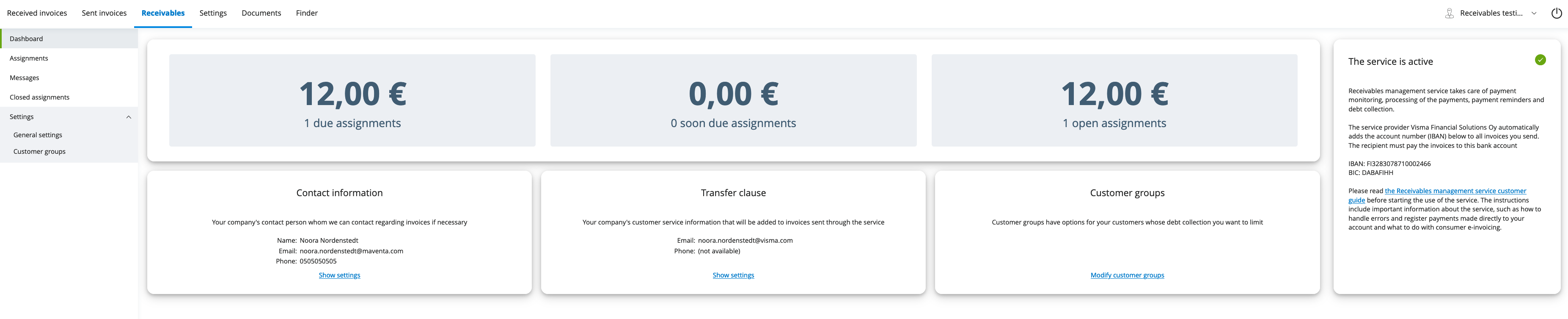
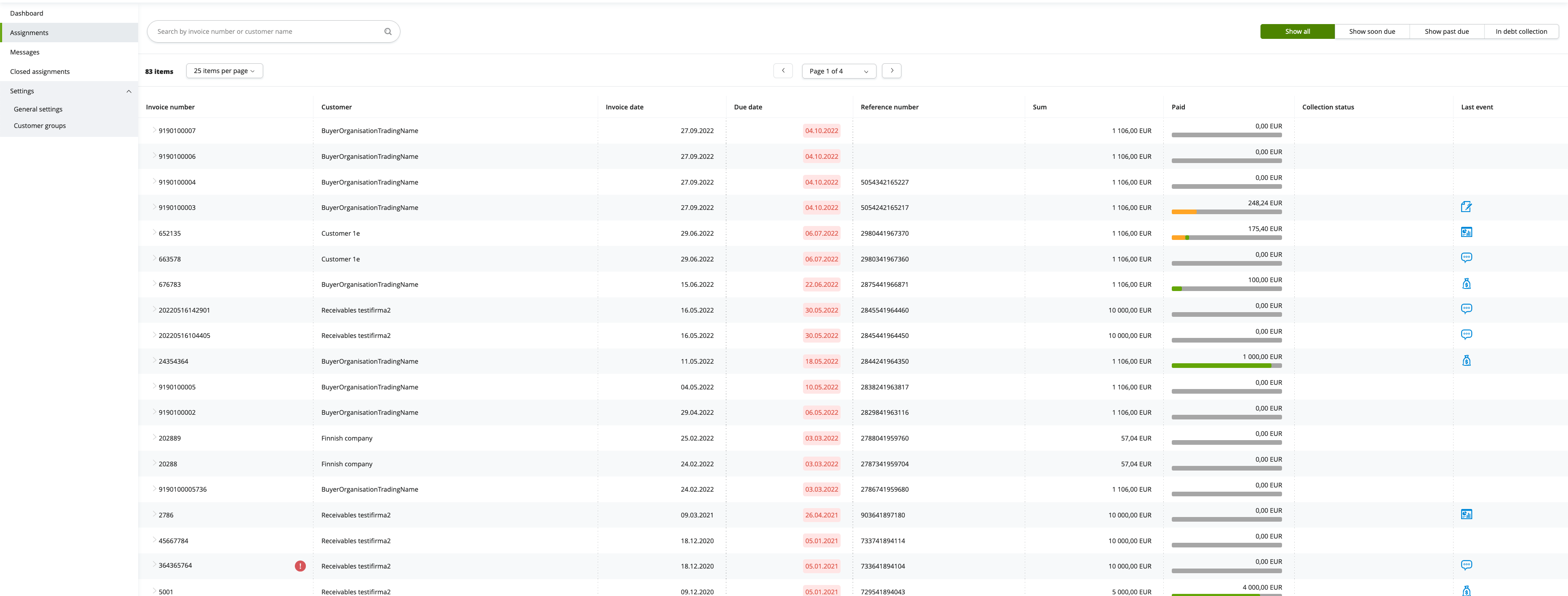
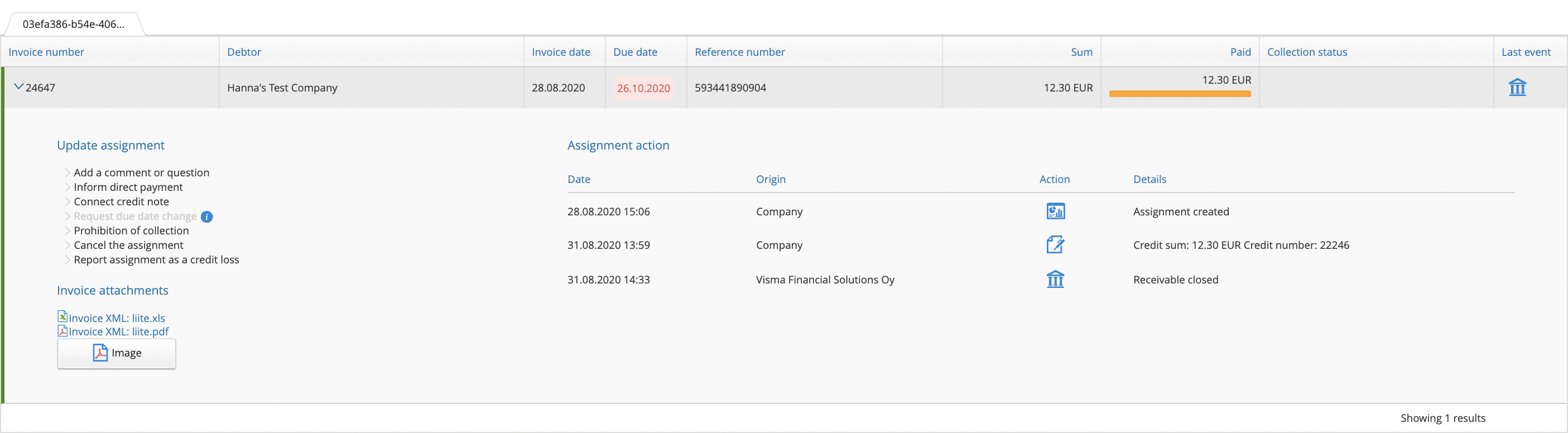
We have done our own implementation for the Receivables API that serves our UI users. The UI is done for our embeddable user interface (EUI) and can therefore be taken easily into use as is and customize by any integrator. For more information about our EUI and how to take that into use can be found here
Dasboard of the receivables. You can show the whole EUI with the main top navigation bar (this way customers can access other parts of the EUI as well):
Listing of open assignments. You can also hide the main menu and only show the Receivables part of the EUI:
Details of one assignment. You can only show the details of only one assignment. This view could be part of the sent invoice details inside the ERP by providing easy and quick access to all the necessary information related to that particular invoice:
Integration scope for Amili Kassavirta
| Full API integration (all done inside the ERP) | Lightweight Integration | No API integration | |
|---|---|---|---|
| Activation | Through API using PUT and GET /v2/services/amili/receivables
|
Full API integration / No API | Through the UI using our form |
| Consumer invoicing | ERP creates and sends automatically the SI CHANGE messages when service gets activated. The IBAN needed is in the response of GET /v2/services/amili/receivables. ERP handles the targeting of the new RI messages in case reference number is the connecting information: The reference number Visma Amili used in the invoice can be found from the assignment details “reference_ids” and type “number” | Full API integration / No API | User creates SI CHANGE messages and then sends them through our UI. Amili IBAN is shown in the Receivables Settings page. User needs to then also somehow handle the targeting of new RI messages manually |
| Assignment listing | /v1/assignments, /v1/assignments/{assignment_id} and /v1/assignments/{assignment_id}/events. Assignments could be listed as their own view or then you could think of having the assignment information (and possibility to add event) shown under the invoice details. | Full API integration / No API | User uses our listing of assignments in our UI |
| Events | /v1/assignments, /v1/assignments/{assignment_id}, /v1/assignments/{assignment_id}/events and /v1/events. You should think a bit how much your users would like to follow up the receivables and which events do they want to see or being able to add themselves. Is it enough to see if there is something happening, for example a comment is added by Visma Amili or if there has been a reminder sent for a customer that hasn’t paid on time? Should these events create some notification on the ERP side when arriving through the API? Adding of events to an assignment is something that should be fully integrated as part of the ERP processes. For example if direct payment comes in then paid event is automatically created from the ERP to the Receivables API. Also having some separate handling for comment events would be beneficial so that important comments or questions from Visma Amili would not get lost and it would be easy for the user to reply | We highly advice to automate at least the events for direct payments (paid event) and connecting credit notes (credit_note event). Also the request to change a due date and then the confirmation for that (due_date_change_request, due_date_changed) |
User needs to handle all the events through our UI which migh in some cases mean double work. For example requesting a new due date might also then need them to do a change also on the ERP side. Informing of direct payments and connecting credit notes are then on the hands of the sender. These are something that are really important to remember to do so that Visma Amili does not start collection process even though the customer has already paid the invoice |
When testing the Amili Kassavirta in our test environment, please note that activation is not automated. To complete the activation flow, you must contact our support team as Amili needs to perform a manual configuration. After activation, all other functionality can be tested normally. This manual step applies only to the test environment—activation in production happens automatically.
Amili Kassavirta service can be closed by calling DELETE /v2/services/amili/receivables or then by closing the service through the user interface. After the service is closed new invoices sent are not routed through Visma Amili anymore. Visma Amili will still handle the open assignments.
NOTE! Even if the user closes the service, API access may still be required to monitor remaining open assignments and perform any necessary actions.