Detect
Detect is an automated service that verifies incoming invoices and their supplier details. It helps companies automate invoice processing, identify potential fraud attempts, and prevent errors in payments and accounting. Detect is integrated into the invoice receiving flow, so notifications appear in the right context alongside the invoice.
Available checks
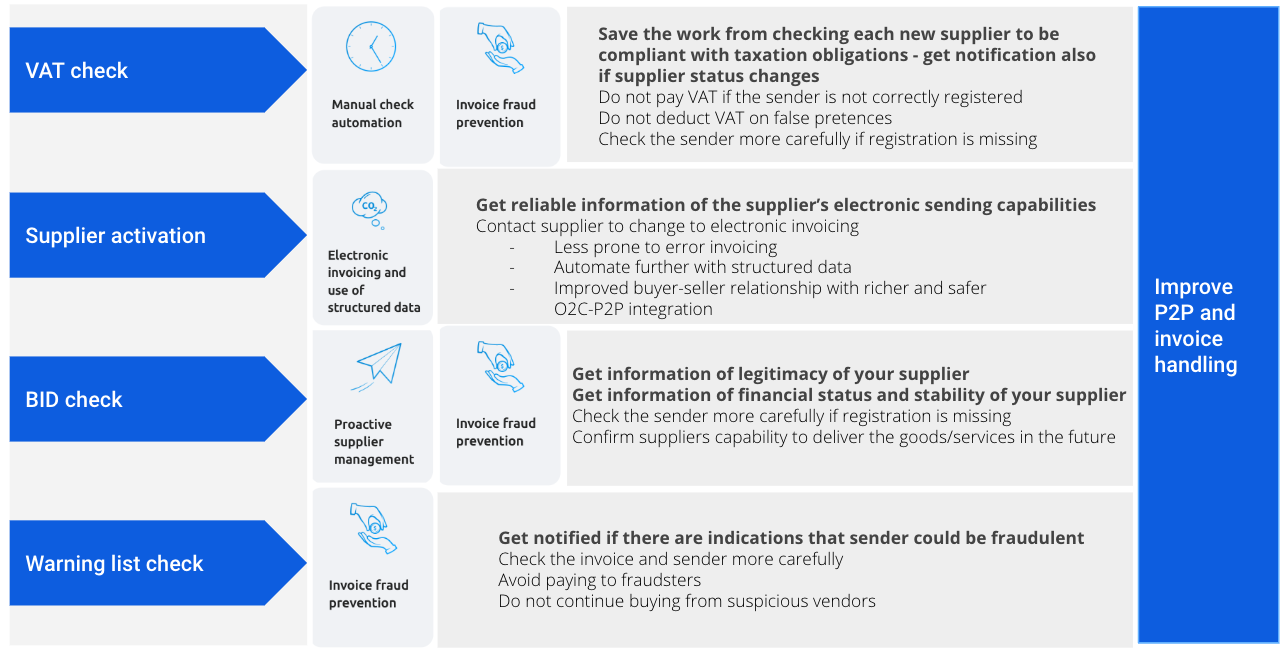
VAT check
VAT — For invoices that include value-added tax (VAT), Detect verifies that the sender is registered in the relevant VAT register. If the total VAT amount on the invoice is below 1 EUR/NOK/SEK (depending on currency), the check is skipped.
The data sources depend on the sender’s country:
- Norway: Brønnøysundregistrene – https://brreg.no
- EU countries: VIES – https://ec.europa.eu/taxation_customs/vies/
- Other countries: not supported
Supplier activation check
SUPPLIER_ACTIVATION — For scanned invoices, Detect checks whether the supplier could have sent the invoice electronically instead.
BID check
SENDER_BID_STATUS — Verifies the sender’s business identifier against central business and bankruptcy registers. This check is available for invoices from Norwegian and Finnish senders. For Finland, it also includes a check against the Prepayment Register.
The check validates that the sender’s business ID is registered and active in the national company register. It also returns information about whether the company is undergoing insolvency or bankruptcy proceedings.
The registers used depend on the sender’s country:
- Finland: YTJ – https://www.ytj.fi
- Norway: Brønnøysundregistrene – https://brreg.no
- Other countries: not supported
Warning list check
SENDER_WARNING_LIST — Verifies the invoice sender against registers that list suspected fraudsters and businesses involved in scams. See the warning list guide section below for details.
Bank account change check
BANK_ACCOUNT_CHANGED — Checks whether the sender has changed their bank account number since the previous invoice. Available for invoices received via Peppol and scanning.
How Detect works
Detect is integrated into the incoming invoice workflow via the REST API. The flow works as follows:
- The receiving company activates the desired checks. Once activated, Maventa automatically runs them on all incoming invoices for that company.
- When an invoice becomes available for download, the corresponding check results are also available to retrieve and display.
- Maventa provides predefined descriptions, notification statuses, and messages. Translations are available in English, Norwegian, Finnish, Swedish, Danish, and Dutch.
- The integrated system (the company’s financial software or ERP) is responsible for activating the checks and displaying the results to the end user.
Integration requirements
Process
- Activate Detect checks — PATCH /v1/services/detect/checks
- Fetch results for each invoice — GET /v1/invoices/{id}/detect_results
- Display the results to the user
Contractual requirements
- The customer has accepted the Terms of Service for Maventa.
- The customer has accepted the General Disclaimer for the service (available at the end of this page).
Authentication
Authenticate as a company and use the analysis scope.
Example flow: activation and usage
Step 1. Activate the service
To start using Detect, activate the checks you want to use for the company.
The end user must be shown and must accept the General Service Disclaimer before any checks are activated.
Use GET /v1/definitions/detect/checks to retrieve all available checks and their details, including which registers each check uses. Display this information to the user.
Use PATCH /v1/services/detect/checks to activate checks:
- Provide an array of check identifiers to activate for the company.
- A successful activation returns status OK. From that point on, the selected checks run automatically on all incoming invoices for the company.
Use GET /v1/services/detect/checks to confirm which checks are currently active.
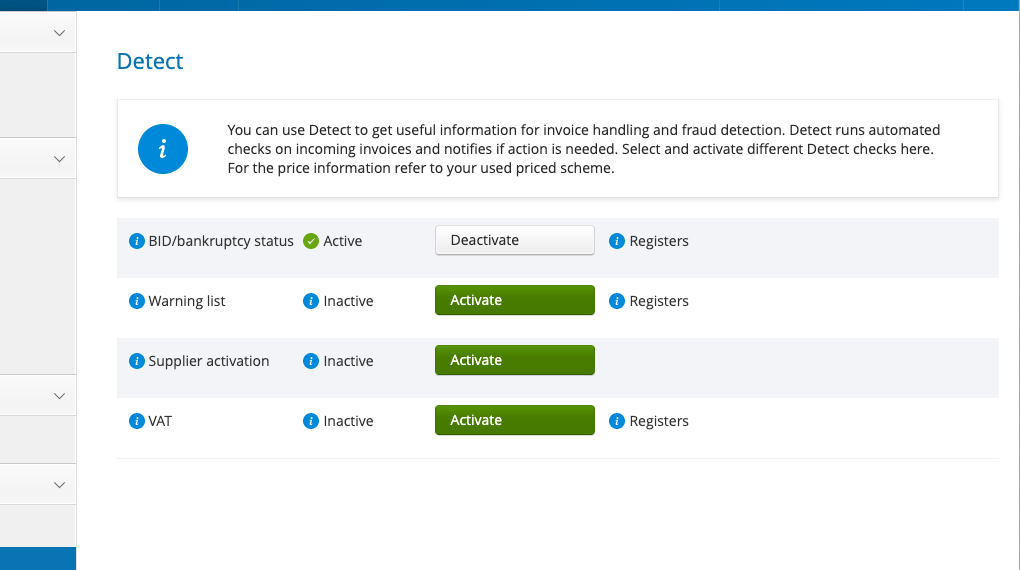
Example of check activation in the Maventa user interface:
Step 2. Run checks on incoming invoices
Once activated, Maventa automatically checks all incoming invoices for the company. When the checks are complete, the invoice is released to the customer’s inbox and the results become available via the REST API.
Invoices and attachments are downloaded as usual. Detect results are retrieved with a separate call:
Use GET /v1/invoices/{id}/detect_results to fetch results for a specific invoice.
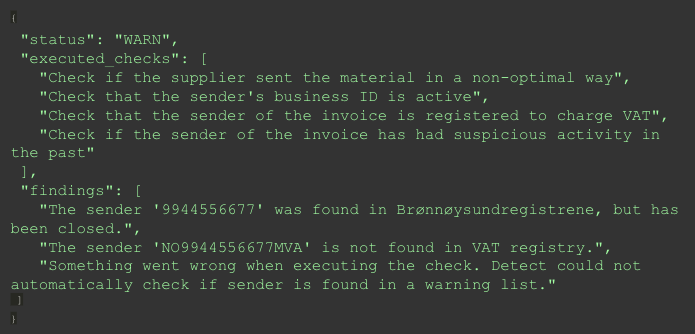
- The response includes results for all activated checks — only one call is needed.
- Invoices are not listed or available for download until all checks are complete.
- If a check fails to run (for example, an external register is unavailable), Maventa retries it automatically.
- The maximum waiting time for invoice release is 4 hours. If a check cannot be completed within that time, it is marked as failed.
Step 3. Display notifications to the user
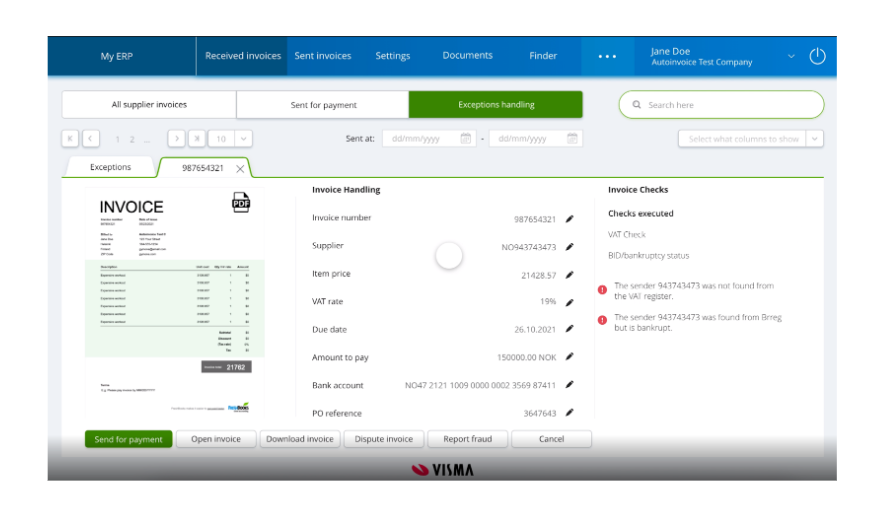
After fetching the check results, display relevant notifications to the user. If an issue is detected, show a notification message within the integrated system — for example, in invoice listings, booking views, or approval screens.
All possible check results and their descriptions are available via GET /v1/definitions/detect/checks.
Example of result display in a user interface:
Step 4. Deactivate checks
Use the same endpoint to deactivate checks:
- Call PATCH /v1/services/detect/checks to modify the active checks.
- To fully close the service, deactivate all checks.
General disclaimer
Visma does not warrant that the customer’s use of the check services will be uninterrupted or error-free, or that the service and/or the information obtained by the customer through the services will meet the customer’s requirements. The customer acknowledges and agrees that the check services will evolve over time and that functionality may be added and removed from time to time.
The customer assumes sole responsibility for results obtained from the use of the check services and for conclusions drawn from them. Visma shall have no liability for any damage caused by errors or omissions in any information, instructions, warnings, or flags provided to the customer in connection with the check services, or the customer’s actions or non-actions in response to such information.
Warning list guide
This section explains the warning list check in detail. It can be shared directly with end users or used as a basis for customer support documentation.
What is a warning list?
A warning list is a register containing alerts about suspected fraudsters and companies involved in scams or business swindles.
How does the warning list check work?
When an invoice is received, the sender’s company information is compared against a set of warning lists. If a match is found, a notification is issued to the invoice receiver.
The check uses the following information from the sender:
- Company name
- Business ID
I received a notification that my invoice is from a company on a warning list. What does this mean?
The invoice sender has been identified in either a third-party register or a Visma user-generated warning list.
Receiving a warning means that the company name or business ID matches information in at least one of the registers.
In the notification message, the “Source” field indicates which register the sender was found in. If the sender appears on multiple registers, all matching register names are included in the notification.
See the list of registers and the criteria for listing companies below.
Sources
The warning list check uses a combination of well-known third-party warning lists and user-reported warnings from Visma customers.
- This set of registers is not exhaustive. A company not appearing on a list does not guarantee the invoice or sender is legitimate.
- The information provided by the registers varies. Some may include example invoices, descriptions of past fraud attempts, or other details about reported cases.
EUIPO
The European Union Intellectual Property Office list contains warnings focused on companies involved in trademark and design services scams. Typically, the name, logo, or service appears very similar to a real organisation.
- Link to register: https://euipo.europa.eu/ohimportal/en/misleading-invoices
- Criteria for listing: based on reported cases
- Contact information:
- Telephone:
+34 965 139 100 - Email:
information@euipo.europa.eu
- Telephone:
- How to get unlisted: contact EUIPO
Svenskhandel Varningslistan
Svenskhandel Varningslistan contains warnings about fraudulent invoices, companies with unscrupulous sales practices, and offers or mailings that may be perceived as misleading.
- Link to register: https://www.svenskhandel.se/sakerhetscenter/varningslistan/
- Criteria for listing: https://www.svenskhandel.se/sakerhetscenter/varningslistan/kriterier-for-publicering/
- Contact information:
- Telephone:
010-47 18 500 - Email:
info@svenskhandel.se - URL: https://www.svenskhandel.se/om-svensk-handel/kontakta-oss/
- Telephone:
- How to get unlisted: contact Svenskhandel
Trygg Handel
The Trygg Handel warning list contains warnings against active fraudsters and business scams.
- Link to register: https://go.trygghandel.no/warninglist
- Criteria for listing: https://go.trygghandel.no/criteria
- Contact information:
- Telephone:
+47 31 00 31 00 - Email:
support@trygghandel.no
- Telephone:
- How to get unlisted: contact Trygg Handel
Visma
Visma users can report an invoice if they suspect the sender is fraudulent. The warning message shows how many different invoice receivers have reported the company.
- Link to register: not publicly available
- Criteria for listing: see Visma warning list criteria below
- Contact information:
- Regular Visma support channel, or
support.maventa@visma.comfor non-Visma customers
- Regular Visma support channel, or
- How to get unlisted: contact Visma
How to handle warnings
Having a routine in place for handling suspected fraud is important. When a warning appears, consider the following steps:
- Confirm with the supplier whether they actually sent the invoice.
- Review the invoice details and compare them against any existing agreements.
- If the invoice appears to be illegitimate, dispute it through the appropriate channel.
- Report suspected fraud — see fraud reporting for details.
Check the relevant regulations and recommended practices for your country and area of business.
Useful links
Financial supervisory authorities
- Norway: Finanstilsynet — https://www.finanstilsynet.no/ (English)
- Finland: FIN-FSA Finanssivalvonta — https://www.finanssivalvonta.fi/ (English)
- Sweden: Finansinspektionen — https://www.fi.se/ (English)
- Denmark: Finanstilsynet — https://www.finanstilsynet.dk/ (English)
- Netherlands: Autoriteit Financiële Markten — https://www.afm.nl/nl-nl (English)
Central business registers
- Norway: Brønnøysundregistrene — https://www.brreg.no/
-
Finland: YTJ / PRH — https://www.ytj.fi/ https://www.prh.fi/ - Sweden: Bolagsverket — https://bolagsverket.se/
- Denmark: CVR - Det Centrale Virksomhedsregister — https://datacvr.virk.dk/
- Netherlands: KVK Chamber of Commerce — https://www.kvk.nl/english/
Visma warning list criteria
The Visma invoice sender warning list is a crowdsourced list of companies suspected by users of Visma’s invoice services, or by a business partner of the sender, to be engaged in suspicious or fraudulent activities.
As part of the warning list check, Detect uses fraud reports from customers. See fraud reporting for details on how to integrate fraud reporting.
Companies are listed based on one or more of the following criteria. The decision to add a company to the list is made through a combination of automated and manual evaluation on a case-by-case basis.
If you suspect a company is listed by mistake, contact Visma through regular support channels or email support.maventa@visma.com.
-
Product or service does not exist — The company is selling a product or service that likely does not exist.
-
Offers sent as invoices — The company sends offers or quotes as invoices, or in a format that can be mistaken for an invoice.
-
Invoices without prior contact — The company sends invoices to companies it has not previously been in contact with, or refers to agreements that do not exist.
-
Invoices not compliant with laws and regulations — The company issues invoices that are missing mandatory information or are otherwise suspected of not following relevant laws and regulations.
-
Misleading name — The company uses a name that can easily be confused with an existing, legitimate company in the same industry.
-
Complaints about business activities — There have been a significant number of complaints about the company’s business activities.
-
No contact information — The company has no contact information, or it is impossible to reach them using the information provided. Key details such as organisation number or legal entity are missing.
-
Misleading marketing or sales — The company has a misleading offering or markets to customers in a way that is suspected to be misleading. The total price of the product or service is not stated in the offer.
-
Suspected illegal business practices — The company’s business is suspected of violating laws and regulations or not following good business practices. This includes missing required registrations in national company and tax registers, not having a board, or being in violation of the EU’s Anti-Money Laundering Directive or other AML/CTF regulations.
-
Known from earlier fraud attempts — The company has attempted fraud before, or is connected to companies known for fraud attempts. This includes the use of falsified signatures, bank accounts or addresses previously known in suspicious contexts, or board members connected to other companies with a history of suspicious activity.
-
Known from earlier suspicious activities — The company has been in the media or is otherwise known for suspicious behaviour. This also applies if the company has connections to other companies or individuals known for suspicious activities.